
1. Johdanto
The Polaroid PLRTC18 Shutter Release Timer Remote Control is designed to provide precise control over your camera's shutter, enabling advanced photographic techniques such as time-lapse, long exposures, and delayed shots. This device connects directly to your compatible Canon DSLR camera via a dedicated cable, allowing you to program various timing functions with accuracy.

Figure 1.1: User operating the PLRTC18 remote control with a camera on a tripod.
Please read this manual thoroughly to understand the features and proper operation of your new remote control.
2. Pakkauksen sisältö
- Polaroid PLRTC18 Shutter Release Timer Remote Control
- Camera Connection Cables (2 types for broad compatibility)
- Käyttöopas
- AAA-paristot (2)
3. Asennus
3.1. Akun asennus
The PLRTC18 requires two AAA batteries for operation. To install:
- Paikanna paristolokeron kansi kaukosäätimen takaa.
- Liu'uta kansi auki nuolen osoittamaan suuntaan.
- Aseta kaksi AAA-paristoa paristolokeroon varmistaen oikean napaisuuden (+/-) lokeron sisällä olevien merkintöjen mukaisesti.
- Sulje paristolokeron kansi, kunnes se napsahtaa tukevasti paikalleen.

Figure 3.1: Battery compartment with two AAA batteries.
Huomautus: To conserve battery life, it is recommended to remove the batteries when the remote control will not be used for an extended period, as there is no dedicated ON/OFF switch.
3.2. Kameraan yhdistäminen
The remote control connects to your camera using one of the provided cables. Identify the correct cable for your specific Canon DSLR model.
- Plug one end of the appropriate connection cable into the remote control's port.
- Plug the other end of the cable into your camera's remote control terminal. This is typically a 3-pin or mini headphone jack style port, often located on the side of the camera body.
- Varmista, että molemmat liitännät ovat kunnolla kiinni.

Figure 3.2: Connecting the remote control cable to a Canon camera.
4. Käyttöohjeet
4.1. Controls Overview
Familiarize yourself with the buttons and LCD display on the remote control:

Figure 4.1: PLRTC18 Remote Control Layout.
- LCD-näyttö: Shows current settings for DELAY, LONG, INTVL (Interval), and N (Number of exposures).
- SET -painike: Käytetään asetustilaan siirtymiseen ja valintojen vahvistamiseen.
- Nuolinäppäimet (ylös/alas/vasemmalle/oikealle): Used to navigate between settings and adjust values.
- AJASTIMEN KÄYNNISTYS/PYSÄYTYS-painike: Käynnistää tai pysäyttää ohjelmoidun ajastinsekvenssin.
- /LOCK Button: Functions as a manual shutter release (half-press for focus, full-press for shutter) and can lock the remote.
4.2. Setting Timer Functions
The remote control allows you to set four primary timing parameters: Delay, Long Exposure, Interval, and Number of Exposures. All settings can be adjusted up to 99 hours, 59 minutes, and 59 seconds in one-second increments.
- Paina SARJA button to enter the setting mode. The first parameter (DELAY) will begin to flash.
- Käytä Vasen/Oikea nuoli buttons to navigate between DELAY, LONG, INTVL, and N.
- Käytä Ylös / alas-nuoli buttons to adjust the values for the selected parameter (hours, minutes, seconds).
- After setting a value, press SARJA again to move to the next digit or parameter.
- Once all desired parameters are set, press SARJA until the display stops flashing and returns to standby mode.
4.2.1. DELAY (Self-Timer)
This sets the amount of time before the first exposure sequence begins. Useful for getting into the shot or allowing camera vibrations to settle.
4.2.2. LONG (Exposure Time)
This sets the duration the camera's shutter will remain open for each exposure. Set your camera to Bulb mode for this function to work correctly.
4.2.3. INTVL (Interval Time)
This sets the time between the end of one exposure and the start of the next. Essential for time-lapse photography.
4.2.4. N (Number of Exposures)
This sets the total number of exposures the remote will trigger. Set to "---" for an unlimited number of shots.
4.3. Ajastimen käynnistäminen ja pysäyttäminen
Once your desired settings are programmed:
- Paina AJASTIN KÄYNNISTYS/PYSÄYTYS button to begin the programmed sequence. The LCD will display a countdown or active timer.
- To stop an ongoing sequence, press the AJASTIN KÄYNNISTYS/PYSÄYTYS painiketta uudelleen.
4.4. Manual Shutter Release
The remote control can also function as a simple wired shutter release.
- Puolipainallus: Paina /LUKKO button halfway down to activate your camera's autofocus.
- Koko lehdistö: Paina /LUKKO laukaise laukaisin painamalla -painike kokonaan alas.
- Locking the Shutter: For continuous shooting or long exposures in Bulb mode (without using the LONG timer function), press the /LUKKO button fully down and slide it forward to lock it in the depressed position. Slide it back to release.
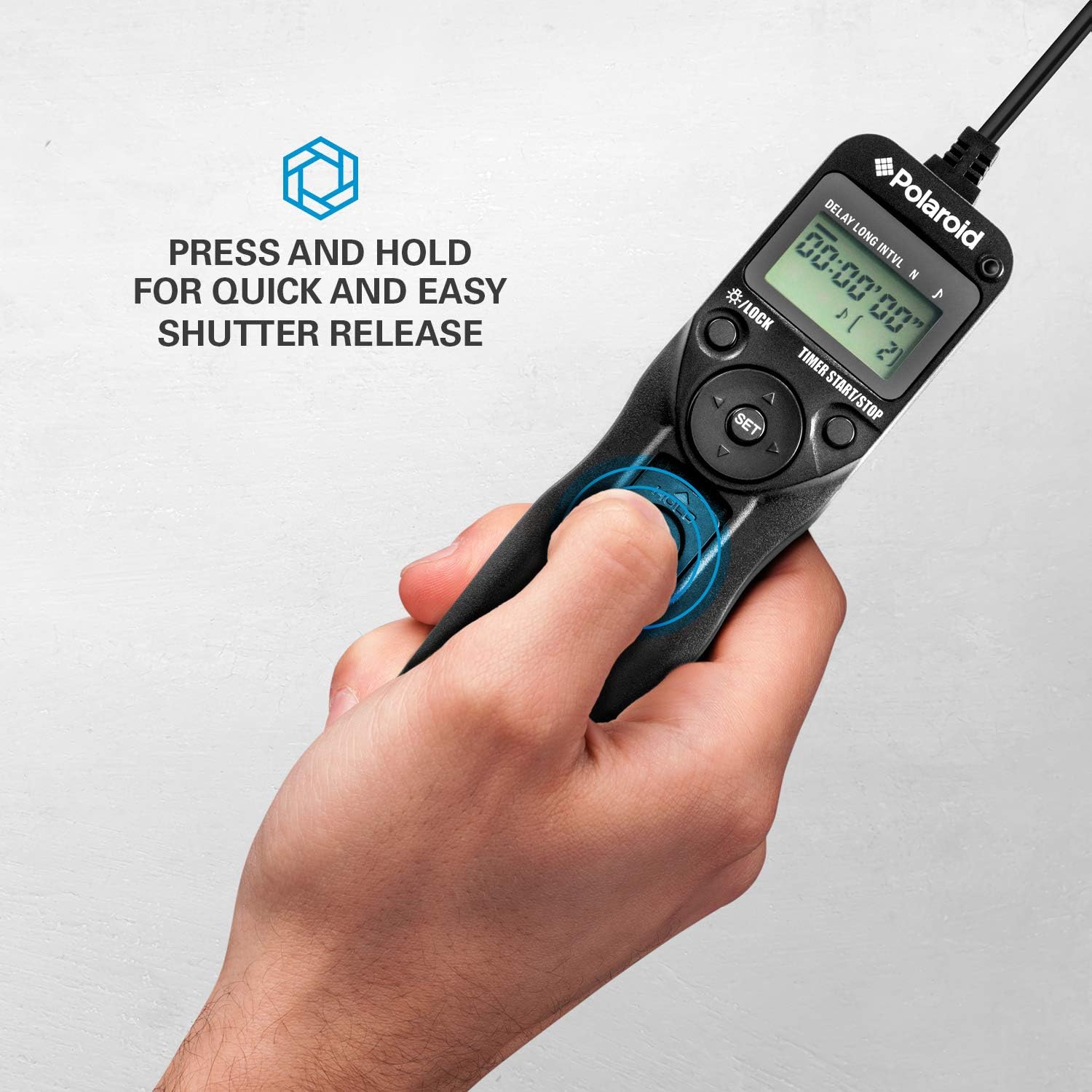
Figure 4.2: Manual shutter release operation.
5. Huolto
- Puhdistus: Pyyhi kaukosäädin pehmeällä, kuivalla liinalla. Älä käytä nestemäisiä puhdistusaineita tai liuottimia.
- Akun hoito: Remove batteries if the unit will not be used for an extended period to prevent leakage. Replace batteries when the low battery indicator appears on the LCD.
- Varastointi: Säilytä kaukosäädintä viileässä, kuivassa paikassa, poissa suorasta auringonvalosta ja äärimmäisistä lämpötiloista.
- Kaapelihuolto: Avoid bending or twisting the connection cables excessively to prevent damage.
6. Vianmääritys
| Ongelma | Mahdollinen syy | Ratkaisu |
|---|---|---|
| Kaukosäädin ei käynnisty. | Paristot ovat tyhjiä tai ne on asennettu väärin. | Tarkista paristojen napaisuus. Vaihda tilalle uudet AAA-paristot. |
| Camera does not trigger. |
|
|
| Ajastinsekvenssi ei käynnisty. | Settings not confirmed or START button not pressed. | Ensure all settings are confirmed with SARJA ja paina sitten AJASTIN KÄYNNISTYS/PYSÄYTYS. |
| LCD-näyttö on himmeä tai välkkyvä. | Akku vähissä. | Vaihda AAA-paristot. |
7. Tekniset tiedot
- Malli: PLRTC18
- Merkki: Polaroid
- Liitettävyys: Langallinen
- Ajastimen toiminnot: Delay, Long Exposure, Interval, Number of Exposures
- Ajastimen asetukset: 1 second to 99 hours, 59 minutes, 59 seconds (in 1-second increments)
- Laukausten määrä: 1 to 9999, or unlimited (---)
- Näyttö: Taustavalaistu LCD
- Virtalähde: 2 x AAA paristot
- Väri: Musta
8. Kameran yhteensopivuus
The Polaroid PLRTC18 is compatible with a wide range of Canon Digital SLR cameras that utilize a 3-pin or mini headphone jack style remote control terminal. Compatible models include, but are not limited to:
- Canon G10, G11, G12, G16
- Canon EOS Digital Rebel series
- Canon 60D, 70D
- Canon Elan II/IIE, Elan 7/7E
- Canon Rebel Ti /2000/G/GII/X/XS
- Canon IX/IX Lite
- Canon SX50 HS
- Canon EOS Rebel T1i, T2, T2i, T3, T3i, T4i, T5, T5i, T6
- And similar models with compatible shutter release ports.
Please consult your camera's manual to confirm the type of remote control port it uses.
9. Takuu ja tuki
For warranty information or technical support, please refer to the documentation included with your purchase or visit the official Polaroid websivusto. Säilytä ostokuitti takuuvaatimuksia varten.