
Johdanto
The Jabra Music Street2 Bluetooth Stereo Headset is designed to provide high-quality audio and hands-free communication. This manual provides essential information for the proper use, maintenance, and troubleshooting of your device. Please read it carefully before use.
Asennus
1. Kuulokkeen lataaminen
Before first use, fully charge the headset. Connect the micro-USB charging cable to the charging port on the headset and the other end to a USB power source.
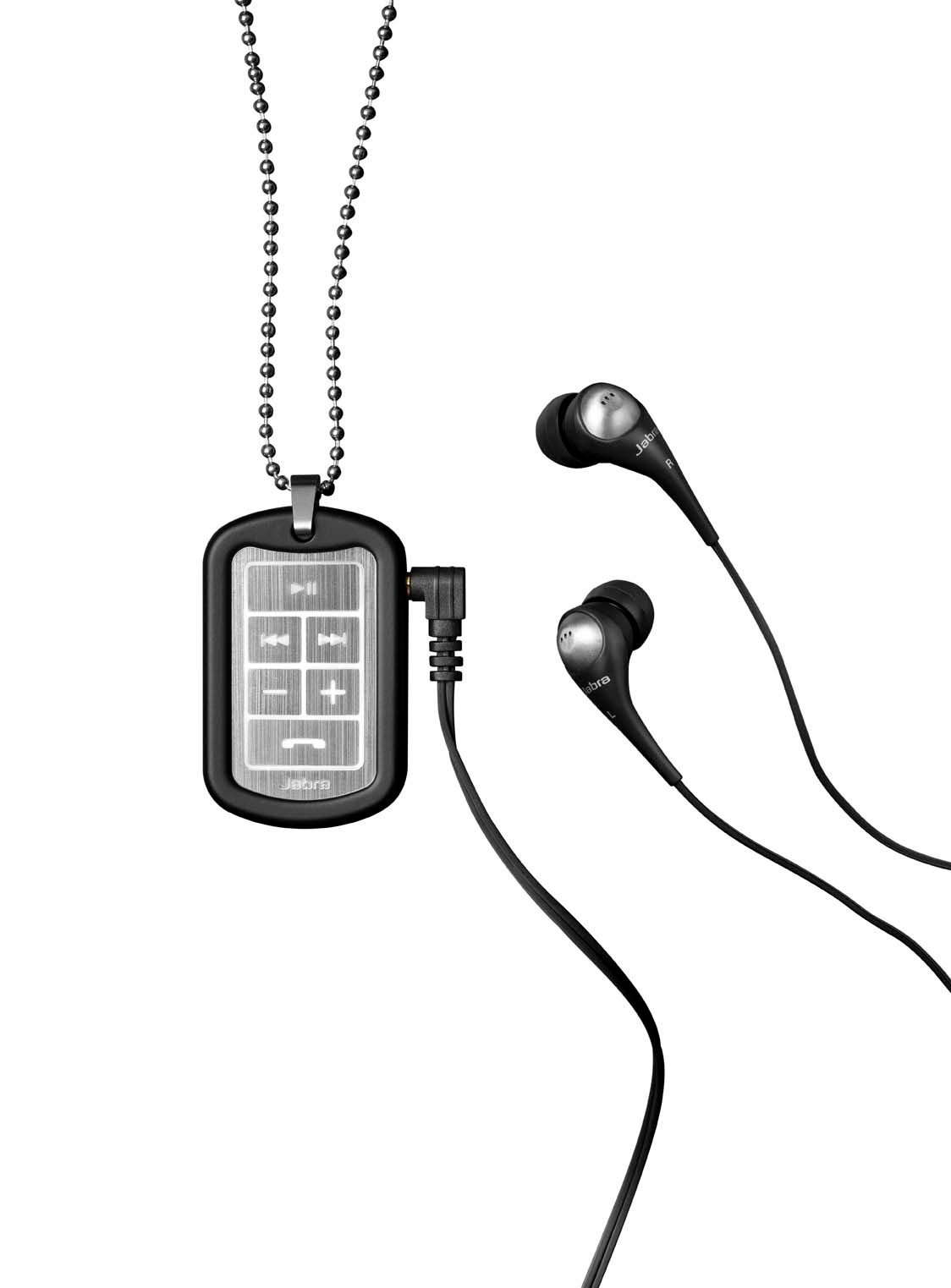
Image: The Jabra Music Street2 headset, highlighting the micro-USB charging port located on the side of the control unit.
- Täysi lataus kestää yleensä noin 2 tuntia.
- LED-merkkivalo näyttää latauksen tilan (esim. punainen latauksen aikana, sininen täyteen ladattu).
2. Pariliitoksen muodostaminen Bluetooth-laitteen kanssa
- Varmista, että HF-laitteesta on katkaistu virta.
- Press and hold the Multi-function button (usually the play/pause button) for approximately 5-7 seconds until the LED indicator flashes blue rapidly. This indicates pairing mode.
- Siirry Bluetooth-laitteellasi (älypuhelin, tabletti jne.) Bluetooth-asetuksiin ja ota Bluetooth käyttöön.
- Etsi available devices. "Jabra Street2" should appear in the list.
- Select "Jabra Street2" to connect. If prompted for a passcode, enter "0000" (four zeros).
- Kun pariliitos on muodostettu, LED-merkkivalo vilkkuu hitaasti sinisenä.
The headset can remember multiple paired devices but can only be connected to one at a time.
Käyttöohjeet
Virta päälle/pois
- Virta päälle: Press and hold the Multi-function button until the LED flashes blue.
- Virta pois: Press and hold the Multi-function button until the LED flashes red and then turns off.
Musiikin ohjaus
- Toista/tauko: Paina monitoimipainiketta kerran.
- Seuraava kappale: Paina "Seuraava kappale" -painiketta (yleensä merkitty eteenpäin osoittavalla nuolella).
- Edellinen kappale: Paina "Edellinen kappale" -painiketta (yleensä merkitty taaksepäin osoittavalla nuolella).
- Ääni kovemmalle: Paina "+"-painiketta.
- Äänenvoimakkuutta pienemmälle: Paina "-"-painiketta.
Puhelujen hallinta
- Vastaa puheluun: Paina monitoimipainiketta kerran.
- Lopeta puhelu: Paina monitoimipainiketta kerran puhelun aikana.
- Hylkää puhelu: Pidä monitoimipainiketta painettuna 2 sekunnin ajan.
- Uudelleenvalinta viimeinen numero: Paina monitoimipainiketta kahdesti, kun puhelu ei ole käynnissä.
- Ääni valinta: Press the Multi-function button once when not on a call (if supported by your phone).
The headset automatically switches between music and calls.
Huolto
- Keep the headset dry. Moisture can damage the electronic circuits.
- Vältä äärimmäisiä lämpötiloja. Korkeat lämpötilat voivat lyhentää elektronisten laitteiden käyttöikää, vahingoittaa akkuja ja vääntää tai sulattaa tiettyjä muoveja.
- Do not attempt to open the headset. Unauthorized modifications can damage the unit and void your warranty.
- Clean the headset with a soft, dry cloth. Do not use harsh chemicals or detergents.
- Säilytä kuulokkeita viileässä ja kuivassa paikassa, kun niitä ei käytetä pitkään aikaan.
Vianetsintä
Ei Virtaa
- Varmista, että kuulokkeet ovat täyteen ladatut. Liitä ne virtalähteeseen ja tarkista latauksen merkkivalo.
Ei voida muodostaa laiteparia laitteen kanssa
- Make sure the headset is in pairing mode (LED flashing blue rapidly).
- Varmista, että Bluetooth on käytössä laitteessasi ja että se on kantaman sisällä (yleensä 10 metriä).
- Try turning off and on both the headset and your Bluetooth device.
- If previously paired, try deleting "Jabra Street2" from your device's Bluetooth list and re-pairing.
Ei ääntä tai huono äänenlaatu
- Tarkista sekä kuulokkeiden että yhdistetyn laitteen äänenvoimakkuustasot.
- Varmista, että kuulokkeet on kytketty oikein laitteeseesi.
- Siirry lähemmäs laitettasi häiriöiden välttämiseksi.
- Ensure the ear buds are correctly inserted and fit snugly to block external noise.
Calls Not Switching Automatically
- Verify that the headset is the active audio device for calls on your phone's Bluetooth settings.
- Some phone models may require manual selection of the audio output during a call.
Tekniset tiedot
| Mallin nimi | Jabra Music Street2 |
| Bluetooth-versio | 3.0 + EDR |
| Wireless Range | Jopa 10 metriä (33 jalkaa) |
| Puheaika | Jopa 8 tuntia |
| Valmiusaika | Jopa 9.5 päivää |
| Latausaika | Noin 2 tuntia |
| Yhteydet | Bluetooth, 3.5 mm Jack (for wired connection if applicable) |
| Ominaisuudet | Virtual surround sound, power bass, noise-blocking ear buds, automatic music/call switching |
Takuu ja tuki
Jabra products are covered by a limited warranty. For specific warranty terms and conditions, please refer to the warranty card included with your product or visit the official Jabra websivusto.
For technical support, frequently asked questions, or to download the latest software/firmware updates, please visit the official Jabra support page:
You may also contact Jabra customer service directly for assistance.


