
1. Johdanto
This user manual provides comprehensive instructions for the Western Digital WD XE 300 GB Enterprise SAS Hard Drive, model WD3001BKHG. It covers essential information regarding the drive's features, proper installation, operation, maintenance, and troubleshooting. Please read this manual thoroughly before installing or using your hard drive to ensure optimal performance and data integrity.
2. Tuote ohiview
The WD XE SAS hard drive is designed for demanding enterprise server and storage applications. It offers high performance and reliability in a compact 2.5-inch form factor. This drive is engineered to meet the rigorous requirements of high-performance computing and mission-critical environments, providing efficient data storage and retrieval.

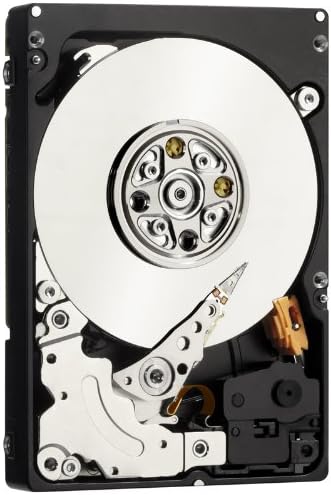
Kuva 1: Yläosa view of the Western Digital WD XE 300 GB Enterprise SAS Hard Drive. This image displays the drive's casing and label, indicating its compact 2.5-inch form factor suitable for server and enterprise storage applications.
3. Tärkeimmät ominaisuudet
- Enterprise-Grade Performance: Ideal for demanding high-performance computing and mission-critical environments.
- Ultra-Fast SAS Interface: Features a 6 Gb/s SAS interface for high-speed data transfer, combined with low power consumption and industry-leading reliability.
- Dual Port Connectivity: Offers dual port, full duplex connectivity for enhanced reliability, performance, and data availability, eliminating single points of failure in high-availability enterprise systems.
- Laaja yhteensopivuus: Works with Windows, Windows Server, Linux, and Mac operating systems. Note that compatibility may vary based on the user's hardware configuration and specific operating system version.
- Kompakti muototekijä: 2.5-inch design, allowing for more system airflow and potentially lower cooling costs in dense server environments.
- Luotettavuus: Backed by a 5-year limited warranty, reflecting its robust design for continuous operation.
4. Asennus ja asetukset
Installing an internal SAS hard drive requires careful handling and adherence to safety procedures. It is recommended that installation be performed by a qualified technician or in accordance with your system's specific documentation.
4.1 Turvaohjeet
- Always wear an anti-static wrist strap when handling the hard drive to prevent electrostatic discharge (ESD) damage.
- Ensure the system is powered off and unplugged from the power source before beginning installation.
- Handle the drive by its edges; avoid touching the circuit board or connector pins.
4.2 Fyysinen asennus
- Valmistele järjestelmä: Open your server or workstation chassis according to the manufacturer's instructions. Identify an available 2.5-inch drive bay.
- Asenna asema: Securely slide the WD XE drive into the designated drive bay. Use mounting screws if required by your system's design.
- Kytke kaapelit: Connect the SAS data cable from the drive to an available SAS port on your system's motherboard or RAID controller. Then, connect the power cable to the drive. Ensure all connections are firm.
- Sulje runko: Once the drive is securely installed and connected, close the system chassis.
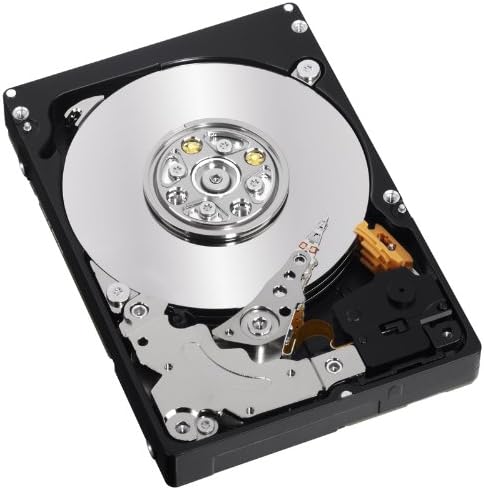
Kuva 2: Sisäinen view of the WD XE SAS Hard Drive. This image shows the internal platters and read/write heads, illustrating the precision engineering within the drive. This view is for informational purposes; the drive should not be opened by the user.
4.3 Alkukokoonpano
- Virta päälle: Reconnect the system to power and turn it on.
- BIOS/UEFI-asetukset: Access your system's BIOS/UEFI settings to confirm the drive is detected.
- Käyttöjärjestelmän asennus: Depending on your operating system, you may need to initialize, partition, and format the drive before it can be used for storage. Refer to your operating system's documentation for detailed instructions. For RAID configurations, consult your RAID controller's manual.
5. Kiintolevyn käyttö
Once installed and configured, the WD XE SAS hard drive operates as a high-speed storage device within your system. Its 10,000 RPM rotational speed and SAS interface ensure rapid data access and transfer rates, crucial for enterprise applications.
- Tietojen tallennus: Use the drive for storing operating systems, applications, and critical data.
- Suorituskyky: The drive is optimized for continuous operation and high I/O workloads typical in server environments.
- Valvonta: Utilize system monitoring tools to check drive health, temperature, and performance metrics.
Kuva 3: Kulmikas sisäinen view of the WD XE SAS Hard Drive. This perspective highlights the intricate mechanical components, including the actuator arm and spindle motor, which contribute to the drive's high performance and reliability.
6. Huolto
Proper maintenance helps ensure the longevity and reliability of your WD XE hard drive.
- Tietojen varmuuskopiointi: Regularly back up critical data to an external storage device or network location. Hard drives, like all mechanical devices, can fail.
- Laiteohjelmistopäivitykset: Check the Western Digital support website periodically for firmware updates. Apply updates as recommended by Western Digital or your system manufacturer.
- Järjestelmän jäähdytys: Ensure your system has adequate airflow and cooling to prevent the drive from overheating, which can degrade performance and lifespan.
- Fyysinen käsittely: Avoid dropping or subjecting the drive to physical shock, especially when it is operating.
7. Vianmääritys
If you encounter issues with your WD XE hard drive, consider the following common troubleshooting steps:
7.1 Asemaa ei havaittu
- Tarkista liitännät: Varmista, että sekä SAS-datakaapeli että virtakaapeli on kytketty kunnolla asemaan ja järjestelmään.
- Verify BIOS/UEFI: Confirm the drive is recognized in your system's BIOS/UEFI settings.
- RAID-ohjain: If using a RAID controller, check its configuration utility to see if the drive is detected and properly configured within the array.
- Ohjaimen päivitykset: Ensure your SAS controller drivers are up to date.
7.2 Suorituskykyongelmat
- Järjestelmäresurssit: Tarkista, ovatko muut järjestelmäkomponentit (prosessori, RAM) suorituskyvyn pullonkauloja.
- Aseman kunto: Use diagnostic tools (e.g., SMART status) to check the drive's health.
- Pirstaloituminen: While less common with modern file systems, excessive file fragmentation can impact performance.
7.3 Epätavalliset äänet
- Clicking or Grinding: Nämä äänet viittaavat usein mekaaniseen vikaan. Varmuuskopioi välittömästi kaikki käytettävissä olevat tiedot ja harkitse levyn vaihtamista.
- Tärinä: Ensure the drive is securely mounted in its bay to prevent excessive vibration.
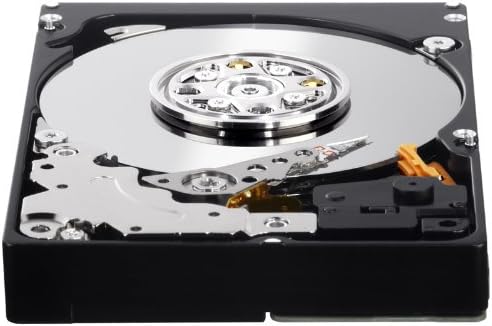
Figure 4: Close-up of the WD XE SAS Hard Drive's connector interface. This image details the SAS data and power connectors, which are crucial for proper installation and communication with the host system.
8. Tekniset tiedot
| Ominaisuus | Erittely |
|---|---|
| Mallinumero | WD3001BKHG |
| Digitaalinen tallennuskapasiteetti | 300 Gt |
| Kiintolevyn käyttöliittymä | Sarjaliitetty SCSI (SAS) |
| Yhteystekniikka | SAS |
| Kiintolevyn muotokerroin | 2.5 tuumaa |
| Kiintolevyn kiertonopeus | 10000 RPM |
| Asennetun välimuistin koko | 32 Mt |
| Tiedonsiirtonopeus | 204 megatavua sekunnissa |
| Yhteensopivat laitteet | Desktop (and server systems) |
| Asennustyyppi | Sisäinen kiintolevy |
| Tuotteen paino | 8.16 unssia |
9. Takuu ja tuki
The Western Digital WD XE 300 GB Enterprise SAS Hard Drive (WD3001BKHG) comes with a 5 vuoden rajoitettu takuu. Tämä takuu kattaa materiaali- ja valmistusvirheet normaalikäytössä.
For detailed warranty terms and conditions, or to initiate a warranty claim, please visit the official Western Digital support websivustolta tai ota yhteyttä suoraan heidän asiakaspalveluunsa. Säilytä ostokuitti takuun voimassaoloa varten.
9.1 Tekninen tuki
If you require technical assistance, have questions about installation, or need help with troubleshooting beyond the scope of this manual, please refer to the following resources:
- Western Digitalin tuki Websivusto: https://support.wdc.com (Huomaa: Tämä on paikkamerkki URL. Refer to official product packaging or the Western Digital corporate website for the most current support links.)
- Verkkotietokanta: Access FAQs, articles, and guides for common issues.
- Asiakaspalvelu: Contact Western Digital customer service via phone or email for personalized support.