
Tuote loppuview
The Targus Presenter AMP09AP is a multimedia presentation remote designed for ease of use during presentations. It features a laser pointer for highlighting content, backlit buttons for low-light environments, and an ergonomic design for comfortable handling. This remote also offers cursor control for remote program access and volume adjustment for media. Its wireless technology provides a range of up to 50 feet, and the USB receiver conveniently stores within the presenter.
Asennusopas
1. Purkaminen
Carefully remove the Targus Presenter AMP09AP and its components from the packaging. The box should contain:
- One Targus Presentation Remote
- One USB Receiver
2. Akun asennus
The Targus Presenter AMP09AP requires batteries (not included). Use alkaline batteries for optimal performance.
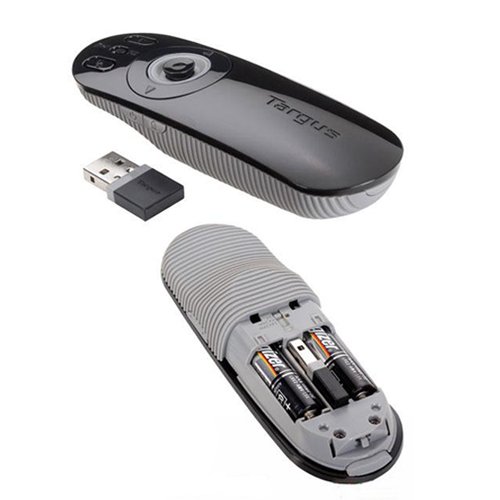
- Paikanna paristolokero esittimen takaa.
- Avaa paristolokeron kansi.
- Aseta tarvittavat paristot paikoilleen varmistaen oikea napaisuus (+/-).
- Sulje paristolokeron kansi kunnolla.
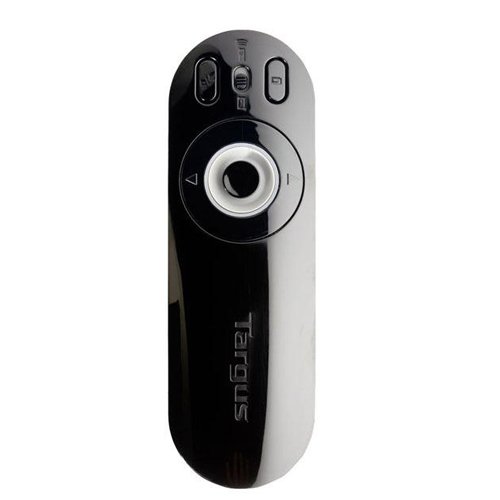
Image: The Targus Presenter AMP09AP, its USB receiver, and the open battery compartment revealing two AAA batteries.
3. USB-vastaanottimen kytkeminen
- Remove the USB receiver from its storage slot within the presenter.
- Liitä USB-vastaanotin tietokoneesi vapaaseen USB-porttiin.
- The computer should automatically detect and install the necessary drivers.
Kaukosäädin on nyt käyttövalmis.
Käyttöohjeet
Esitystila
The presenter's simplistic layout allows for easy navigation during presentations.
Kuva: Yläosa view of the Targus Presenter AMP09AP, highlighting the laser pointer button, slide navigation buttons, and the mode switch.
- Laserosoitin: Press and hold the dedicated laser button to activate the laser pointer for highlighting content.
- Next Slide: Press the forward arrow button to advance to the next slide.
- Previous Slide: Press the backward arrow button to return to the previous slide.
- Taustavalaistu painikkeet: Buttons are backlit for visibility in dimly lit rooms.
Cursor Control Mode
The presenter features cursor control for remote access to programs and media functions.
- Activating Cursor Control: Use the mode switch (located at the top right of the remote) to toggle between presentation and cursor control modes.
- Moving Cursor: Use the central circular button (joystick/directional pad) to move the mouse cursor on the screen.
- Klikkaamalla: Press the center of the circular button to perform a left-click action.
- Äänenvoimakkuuden säätö: Adjust the volume for music and videos remotely using the designated volume controls (if available on your specific model).
Wireless Range
The wireless technology allows operation up to 50 feet (approximately 15 meters) from the computer, providing flexibility during presentations.
Huolto
- Puhdistus: Pyyhi esityslaite pehmeällä, kuivalla liinalla. Vältä voimakkaiden kemikaalien tai hankaavien puhdistusaineiden käyttöä.
- Akun vaihto: Replace batteries when the indicator light (if present) signals low power, or when performance degrades. Ensure correct polarity during replacement.
- Varastointi: When not in use, store the USB receiver inside the presenter's dedicated slot to prevent loss. Store the presenter in a cool, dry place.
Vianetsintä
| Ongelma | Mahdollinen syy | Ratkaisu |
|---|---|---|
| Esittäjä ei vastaa | Paristot vähissä tai tyhjät | Vaihda paristot uusiin alkaliparistoihin. |
| Esittäjä ei vastaa | USB-vastaanotinta ei ole kytketty oikein | Varmista, että USB-vastaanotin on kytketty tukevasti tietokoneen toimivaan USB-porttiin. Kokeile toista USB-porttia. |
| Esittäjä ei vastaa | Kantaman ulkopuolella | Move closer to the computer (within 50 feet / 15 meters). |
| Laserosoitin ei toimi | Akku vähissä | Vaihda paristot. |
| Cursor control erratic or not working | Interference or mode not activated | Ensure no obstructions between presenter and receiver. Check if cursor control mode is active using the mode switch. |
Tekniset tiedot
| Ominaisuus | Yksityiskohta |
|---|---|
| Merkki | Targus |
| Mallinumero | AMP09AP-51 |
| Väri | Musta ja harmaa |
| Mitat (PxLxK) | 12.1 x 3.8 x 2.5 cm |
| Tuotteen paino | 140 g |
| Yhteystekniikka | Langaton |
| Wireless Range | Jopa noin 15 metriä (50 jalkaa) |
| Akun tyyppi | Alkalinen (ei sisälly) |
| Mukana olevat komponentit | Presentation Remote, USB Receiver |
| Erikoisominaisuudet | Ergonomic design, Laser pointer, Cursor control, Backlit buttons |
Takuu ja tuki
For warranty information and technical support, please refer to the documentation provided with your purchase or visit the official Targus websivusto. Säilytä ostokuitti takuuvaatimuksia varten.