
Tuote loppuview
The iSound Twist Portable Bluetooth Wireless Speaker offers a unique design combined with superior sound quality. Its compact form factor allows for portability, while its advanced features enable wireless music streaming and hands-free calling. The speaker features full stereo sound with 6 watts total output from two 40mm drivers and a passive radiator for enhanced bass.
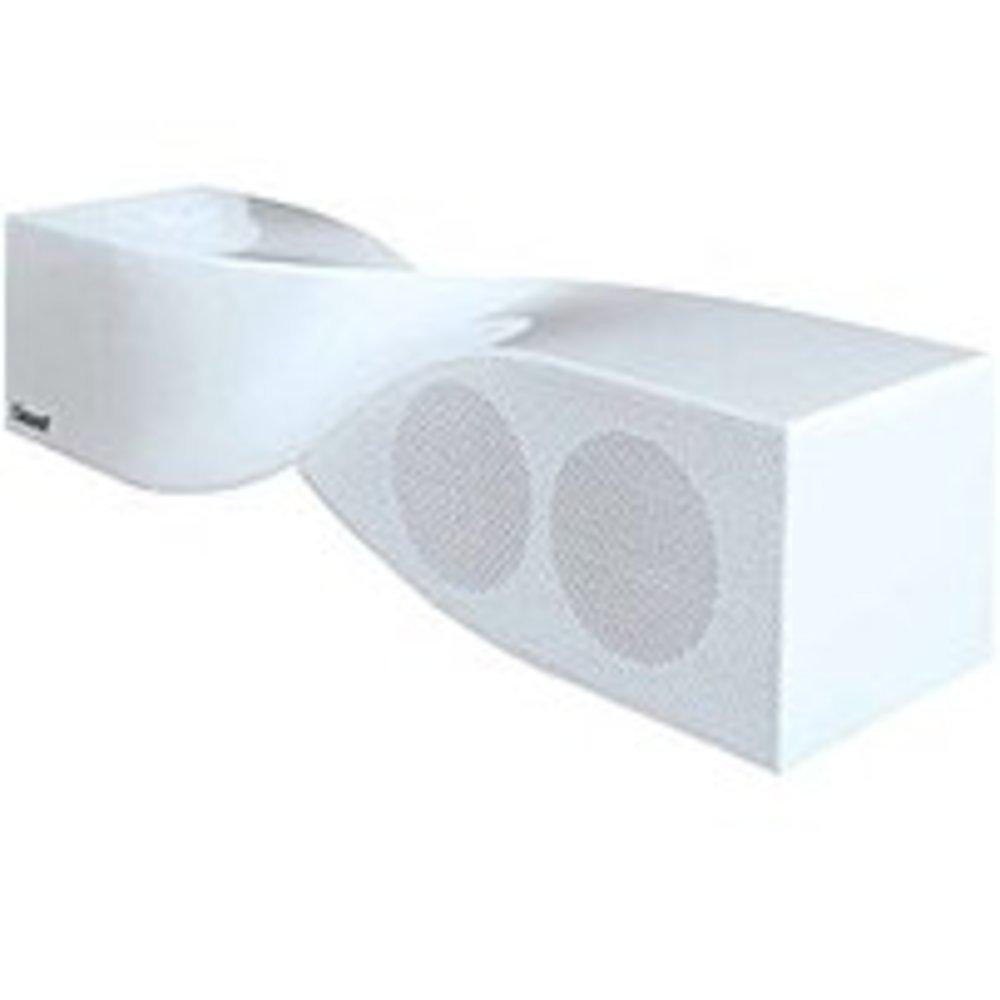
Image: The iSound Twist Portable Bluetooth Wireless Speaker in white, showcasing its unique twisted design.
Pakkauksen sisältö
- iSound Twist Portable Bluetooth Wireless Speaker
- USB-latauskaapeli
- 3.5 mm:n AUX-tulokaapeli
- Käyttöopas (tämä asiakirja)
Asennus
1. Kaiuttimen lataaminen
Before initial use, fully charge the iSound Twist speaker. Connect the provided USB charging cable to the speaker's USB charging port and the other end to a powered USB source (e.g., computer, USB wall adapter). The charging indicator light will illuminate during charging and turn off when fully charged. A full charge provides up to 5 hours of continuous play.

Image: Rear panel of the speaker, highlighting the USB charging port, ON/OFF switch, and AUX IN port.
2. Virta päälle / pois
Locate the ON/OFF switch on the rear panel of the speaker. Slide the switch to the "ON" position to power on the device. Slide it to the "OFF" position to power off.
3. Bluetooth-pariliitos
- Ensure the speaker is powered on and within close proximity to your Bluetooth-enabled device (e.g., smartphone, tablet, laptop).
- The speaker will automatically enter Bluetooth pairing mode. A blue indicator light will flash, indicating it is discoverable.
- Siirry laitteellasi Bluetooth-asetuksiin ja ota Bluetooth käyttöön.
- Etsi available devices. The iSound Twist speaker should appear in the list, typically named "iSound Twist" or similar.
- Select the speaker from the list to initiate pairing. If prompted for a password, enter "0000".
- Once successfully paired, the blue indicator light on the speaker will stop flashing and remain solid. You will hear an audible confirmation.
- Your device is now connected, and you can stream audio wirelessly.
4. AUX-tuloliitäntä
For devices without Bluetooth capability, or if you prefer a wired connection, use the provided 3.5mm AUX cable.
- Connect one end of the 3.5mm AUX cable to the AUX IN port on the rear of the speaker.
- Liitä kaapelin toinen pää äänilaitteen kuulokeliitäntään tai äänilähtöporttiin.
- Kaiutin vaihtaa automaattisesti AUX-tulotilaan.
Käyttöohjeet
Ohjauspaneelin toiminnot
The speaker features onboard controls located on its top surface for convenient operation.
- Virta / tila-painike: Press and hold to power on/off. Short press to switch between Bluetooth and AUX modes.
- Toista/tauko/puhelupainike: Short press to play or pause music. During an incoming call, short press to answer or end the call. Press and hold to reject an incoming call.
- Äänenvoimakkuuden lisäys-/seuraava kappale -painike: Short press to increase volume. Press and hold to skip to the next track.
- Äänenvoimakkuuden vähennys-/edellinen kappale -painike: Short press to decrease volume. Press and hold to go to the previous track.
Handsfree-puhelut
When connected via Bluetooth, the iSound Twist speaker's built-in microphone allows for hands-free phone calls.
- Puheluun vastaaminen: When a call comes in, the music will pause. Press the Play/Pause/Call button once to answer.
- Puhelun lopettaminen: During a call, press the Play/Pause/Call button once to end the call.
- Puhelun hylkääminen: Press and hold the Play/Pause/Call button to reject an incoming call.
Huolto
- Pidä kaiutin poissa vedestä, kosteudesta ja äärimmäisistä lämpötiloista.
- Puhdista kaiutin pehmeällä, kuivalla liinalla. Älä käytä hankaavia puhdistusaineita tai liuottimia.
- Vältä pudottamasta kaiutinta tai altistamasta sitä voimakkaille iskuille.
- Kun kaiutinta ei käytetä pitkään aikaan, säilytä sitä viileässä ja kuivassa paikassa ja lataa se säännöllisesti akun kunnon ylläpitämiseksi.
Vianetsintä
| Ongelma | Ratkaisu |
|---|---|
| Kaiutin ei käynnisty. | Varmista, että akku on ladattu. Liitä kaiutin virtalähteeseen USB-kaapelilla ja yritä uudelleen. |
| Pariliitos Bluetoothin kautta ei onnistu. |
|
| Ei ääntä tai äänenvoimakkuus on alhainen. |
|
| Puhelun laatu on huono. |
|
Tekniset tiedot
| Ominaisuus | Yksityiskohta |
|---|---|
| Mallin nimi | ISOUND-1691 |
| Merkki | iSound |
| Kaiuttimen tyyppi | Torni |
| Erikoisominaisuus | Sisäänrakennettu mikrofoni |
| Suositellut käyttötavat | For Smartphones or Tablets, Music Players |
| Yhteensopivat laitteet | Pöytätietokone, Kannettava tietokone, MP3-soitin, Projektori, Älypuhelin, Tabletti, Televisio |
| Surround-äänikanavan asetukset | 2.0 |
| Väri | Valkoinen |
| Tuotteen paino | 13.6 unssia |
| On vedenpitävä | EPÄTOSI |
| Langaton viestintätekniikka | Bluetooth |
| Kaiuttimen koko | 0.75 tuumaa |
| Virtalähde | Paristokäyttöinen |
| Paristojen lukumäärä | Tarvitaan 1 litiumioniakku. (mukana) |
| Ääniohjaimen tyyppi | Dynaaminen ohjain |
| Ääniohjaimen koko | 40 millimetriä |
| Tuotteen mitat | 5 x 4 x 11.75 tuumaa |
| Kaiuttimen suurin lähtöteho | 6 wattia |
| Yhteystekniikka | Langaton |
| Äänilähtötila | Stereot |
| Asennustyyppi | Pöytäteline |
Virallinen tuotevideo
Video: Official product video for the iSound Twist Bluetooth Speaker, demonstrating its features and design. This video showcases the speaker's ability to stream audio from various devices and handle calls.
Takuu ja tuki
The iSound Twist Portable Bluetooth Wireless Speaker comes with a Rajoitettu takuu. For specific warranty terms, conditions, and support inquiries, please refer to the warranty card included in your product packaging or visit the official iSound websivusto.
For further assistance, please contact iSound customer support.