
1. Johdanto
The Antec Eleven Hundred is a Super Mid Tower computer case designed to accommodate high-performance PC builds. It supports a wide range of components, including XL-ATX motherboards and multiple graphics card configurations. The case features an advanced cooling system with pre-installed fans and multiple additional fan mounts, along with efficient cable management solutions to ensure a clean and optimized internal layout.
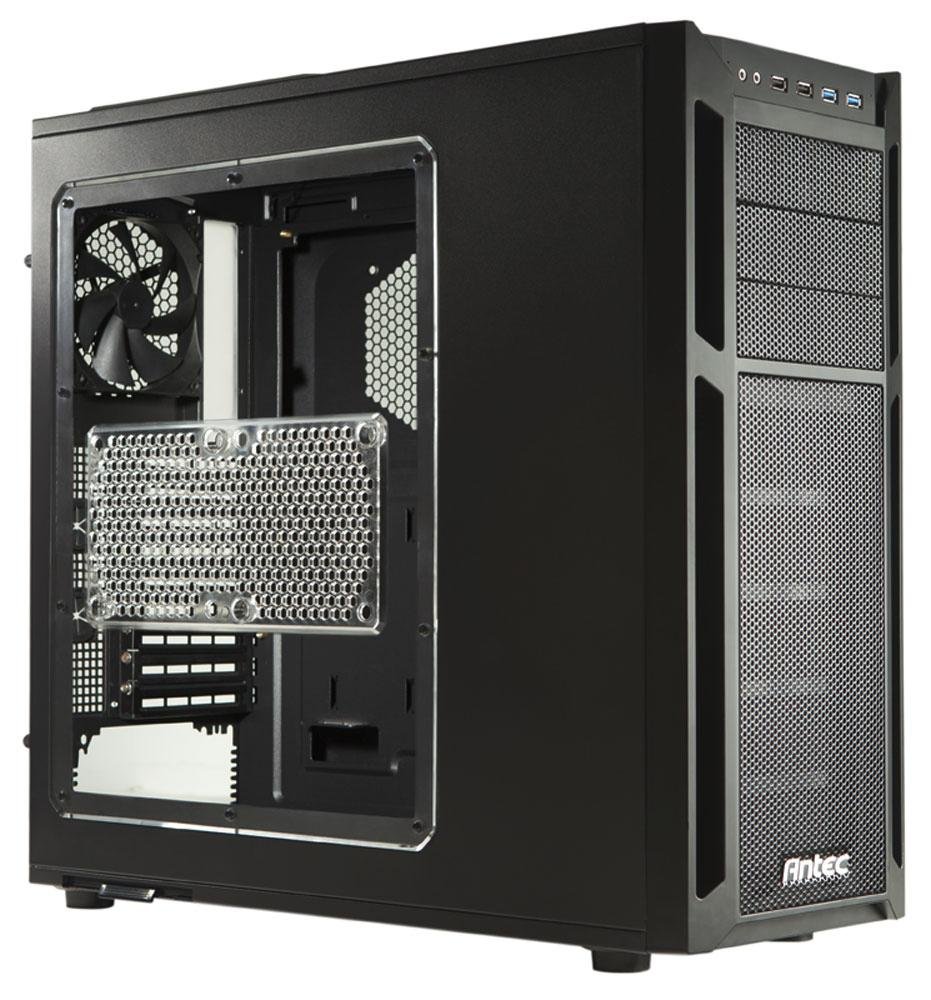
2. Asennus ja komponenttien asennus
This section provides instructions for installing various components into your Antec Eleven Hundred case.
2.1 Emolevyn asennus
The Eleven Hundred case supports XL-ATX motherboards (up to 10.3 x 13.6 inches).
- Prepare the motherboard tray by installing the necessary standoffs for your motherboard form factor.
- Aseta emolevy varovasti tukien päälle ja kohdista ruuvinreiät.
- Kiinnitä emolevy ruuveilla.
2.2 Näytönohjaimen (GPU) asennus
The case features nine expansion slots and can accommodate graphics cards up to 13 inches (330 mm) in length, supporting multi-GPU configurations (e.g., three-way NVIDIA SLI or four-way AMD CrossFireX™).
- Irrota tarvittavat laajennuspaikkojen suojat kotelon takaosasta.
- Insert the graphics card into the appropriate PCIe slot on your motherboard.
- Secure the graphics card with the provided thumb screws.
2.3 Taajuusmuuttajan asennus
The Eleven Hundred offers eleven drive bays: three 5.25-inch bays and six 3.5-inch tool-less bays. Additionally, there are two 2.5-inch drive mounts.
- 5.25 tuuman asemat: Utilize the tool-less mechanisms for easy installation of optical drives or other 5.25-inch devices.
- 3.5 tuuman asemat: The six 3.5-inch bays feature tool-less trays. Slide your hard drive into a tray and then slide the tray into the bay until it clicks into place.
- 2.5-inch Drives (SSDs): Dedicated mounts are available for 2.5-inch solid-state drives. Secure these drives with screws.
2.4 Cooling System and Fan Installation
The case includes a 200 mm blue LED top exhaust fan and a 120 mm rear exhaust fan. It also provides mounts for up to seven additional fans for enhanced cooling.
- Additional Fan Mounts: Strategic positions are available for optional fans, including an intake fan mount behind the motherboard tray for CPU cooling.
- Fan Power Hub: A convenient fan power hub allows connection of up to four 3-pin fans to a single Molex connector, simplifying cable management.
- Liquid Cooling Compatibility: The Eleven Hundred is compatible with Antec KÜHLER H2O liquid CPU coolers.
2.5 Kaapelin hallinta
Effective cable management is crucial for airflow and aesthetics. The case provides 36 mm of space behind the motherboard tray and features grommet-lined cable routing holes.
- Route power supply cables and data cables through the grommeted holes to the rear of the motherboard tray.
- Hyödynnä ample space behind the tray to organize and secure cables using cable ties.
- Connect front panel I/O cables (USB 3.0, USB 2.0, HD Audio) to the corresponding headers on your motherboard. The two front USB 3.0 ports connect via internal motherboard connectors.
3. Käyttö
Once all components are installed and connected, close the side panels. Power on your system. The pre-installed fans will begin operating to provide cooling.
3.1 Etupaneelin I/O
Etupaneeli tarjoaa kätevän pääsyn seuraaviin kohteisiin:
- 2 x USB 3.0 -porttia
- 2 x USB 2.0 -porttia
- HD Audio jacks (headphone and microphone)
- Virtapainike
- Reset-painike
4. Huolto
Regular maintenance helps ensure optimal airflow and component longevity.
4.1 Ilmansuodattimien puhdistaminen
The Eleven Hundred case is equipped with removable and washable air filters to prevent dust buildup.
- PSU Air Intake Filter: Located at the bottom of the case, beneath the power supply.
- Front Air Intake Filter: Located behind the quick-release front bezel.
Puhdistaaksesi:
- Irrota suodattimet varovasti.
- Wash them with water and mild soap, or use a vacuum cleaner to remove dust.
- Varmista, että suodattimet ovat täysin kuivat ennen niiden takaisin asentamista.
4.2 Yleinen puhdistus
Use a soft, dry cloth to wipe down the exterior of the case. For internal cleaning, use compressed air to remove dust from fans and components. Ensure the system is powered off and unplugged before performing any internal cleaning.
5. Vianmääritys
Tässä osiossa käsitellään yleisiä ongelmia, joita saatat kohdata.
5.1 Liiallinen tuulettimen melu
If you experience unusual or excessive noise from the fans, particularly the top 200mm fan:
- Tarkista esteet: Ensure no cables or debris are interfering with the fan blades.
- Tuulettimen asennus: Verify that all fans are securely mounted and screws are tightened.
- Virtaliitäntä: The included fans connect via Molex. If connected to a motherboard fan header, ensure fan speed settings in the BIOS/UEFI or operating system are appropriate.
- Komponenttien kuluminen: Over time, fan bearings can wear out, leading to increased noise. Consider replacing the fan if it remains noisy after checking the above.
5.2 Poor Airflow or Overheating
Jos komponentit kuumenevat odotettua kuumemmin:
- Puhtaat suodattimet: Ensure all air intake filters are clean and free of dust.
- Kaapelin hallinta: Verify that internal cables are neatly routed and not obstructing airflow.
- Tuulettimen kokoonpano: Ensure fans are oriented correctly for optimal airflow (intake at front/bottom, exhaust at rear/top). Consider adding optional fans to improve cooling.
- Komponenttien istuimet: Check that CPU coolers and GPU heatsinks are properly seated and making good contact.
6. Tekniset tiedot
| Merkki | Antec |
| Malli | Eleven Hundred |
| Asian tyyppi | Super Mid Tower |
| Väri | Musta |
| Materiaali | Seosteräs |
| Emolevyn yhteensopivuus | XL-ATX, ATX, Micro-ATX, Mini-ITX |
| Laajennuspaikat | 9 |
| Drive Bays | 3 x 5.25" (external), 6 x 3.5" (internal, tool-less), 2 x 2.5" (internal) |
| Edessä olevat I / O-portit | 2 x USB 3.0, 2 x USB 2.0, HD Audio In/Out |
| Mukana fanit | 1 x 200mm Top Exhaust (Blue LED), 1 x 120mm Rear Exhaust |
| Optional Fan Mounts | Up to 7 additional fans |
| GPU:n maksimipituus | 13 tuumaa (330 XNUMX mm) |
| Kaapelinhallintatila | 36 mm behind motherboard tray |
| Mitat (K x L x S) | 20.7 x 9.3 x 21.5 tuumaa (52.6 x 23.6 x 54.6 cm) |
| Paino | 20 lbs (9 kg) |
| UPC | 761345159500 |
| ASIN | B005X3E4YC |
7. Takuu ja tuki
7.1 Valmistajan takuu
The Antec Eleven Hundred computer case is backed by a manufacturer's kolmen vuoden rajoitettu takuu, covering both parts and labor. Please retain your proof of purchase for warranty claims.
7.2 Asiakastuki
For technical assistance, warranty inquiries, or to report any issues, please contact Antec customer support. Refer to the official Antec websivustolta löydät ajankohtaisimmat yhteystiedot ja tukiresurssit.