
Johdanto
This manual provides essential information for the safe and effective operation of your Laserliner SoundTest-Master 082.070A Noise Level Meter. Please read these instructions carefully before using the device and keep them for future reference. The SoundTest-Master 082.070A is designed for precise measurement of noise levels, featuring integrated long-term memory and PC connectivity for comprehensive documentation.
Turvallisuusohjeet
- Always operate the device within its specified environmental conditions.
- Älä altista laitetta äärimmäisille lämpötiloille, kosteudelle tai suoralle auringonvalolle.
- Vältä laitteen pudottamista tai sen altistamista voimakkaille iskuille.
- Älä yritä avata tai muokata laitetta. Korjauksia saa suorittaa vain valtuutettu henkilöstö.
- Pidä laite poissa vahvoista magneettikentistä.
- Ensure the microphone is clean and free from obstructions for accurate measurements.
Tuote loppuview
The Laserliner SoundTest-Master 082.070A is a handheld noise level meter equipped with a sensitive electret condenser microphone and a clear, illuminated display. It features various controls for measurement settings and data management.

Kuva 1: Edessä view of the SoundTest-Master 082.070A, showing the display, microphone with windshield, and control buttons.
Tärkeimmät komponentit:
- Elektreettikondensaattorimikrofoni: For capturing sound. Includes a removable windshield.
- Valaistu näyttö: Shows measurement values, settings, and status.
- Ohjauspainikkeet: Power, Setup, Max, Record, A/C weighting, Fast/Slow time weighting, Level adjustment, Data send.
- Analogiset lähdöt: DC and AC outputs for external connections.
- RS232-liitäntä: Optoisolated port for PC connection and data transfer.
Asennus
1. Akun asennus
The device requires batteries for operation. Ensure correct polarity when inserting batteries into the compartment, typically located on the rear of the unit.
2. Ensimmäinen käynnistys
Paina Tehoa button to turn on the device. The display will illuminate and show initial readings.
3. Tuulilasin kiinnitys
Attach the removable windshield to the microphone to minimize wind noise interference during outdoor measurements.
Käyttöohjeet
1. Perusmittaus
- Käynnistä laite käyttämällä Tehoa -painiketta.
- Suuntaa mikrofoni äänilähdettä kohti.
- The current noise level will be displayed in decibels (dB).
2. Frequency Weighting (dB(A), dB(C))
Käytä Ilmastointi button to switch between frequency weighting curves:
- dB (A): Simulates the human ear's response to sound, commonly used for environmental noise measurements.
- dB(C): Provides a flatter response, suitable for measuring peak sound pressure levels or low-frequency noise.
3. Time Weighting (Fast/Slow)
Paina NOPEA HIDAS -painiketta valitaksesi halutun aikapainotuksen:
- FAST (125 ms): For measuring rapidly changing noise levels.
- SLOW (1 second): For measuring average noise levels over a longer period, suitable for stable noise sources.
4. Tiedonkeruu ja tietokoneyhteys
The device features a long-term recording function with 16,000 memory points and real-time logging capabilities when connected to a PC.
- Internal Data Logging: Paina TALLENTAA button to start/stop internal data recording. The device can store up to 16,000 measurement points.
- PC-yhteys: Connect the device to a computer using the provided RS232 cable.
- Ohjelmisto: Install the provided software on your PC. This software allows for real-time data display, analysis, and download of recorded data.
- Tietojen lähettäminen: Käytä LÄHETÄ TIEDOT button to initiate data transfer to the connected PC.
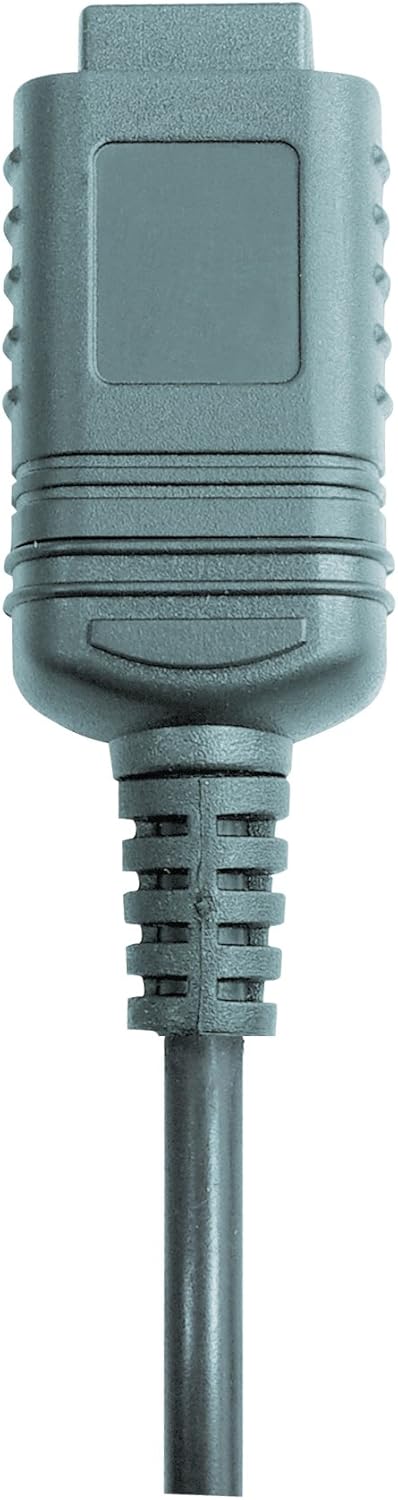

Kuva 2: RS232 cable connectors used for connecting the SoundTest-Master to a PC.
5. Kalibrointi
The device can be calibrated and adjusted using a standard noise level calibrator (94 dB / 1 kHz). Refer to the calibrator's instructions for the specific calibration procedure.
Huolto
1. Puhdistus
- Pyyhi laite casing pehmeällä, kuivalla liinalla.
- Älä käytä hankaavia puhdistusaineita tai liuottimia.
- Ensure the microphone is kept clean and free of dust or debris.
2. Varastointi
When not in use, store the SoundTest-Master in its protective case in a cool, dry place, away from direct sunlight and extreme temperatures. Remove batteries if storing for extended periods.
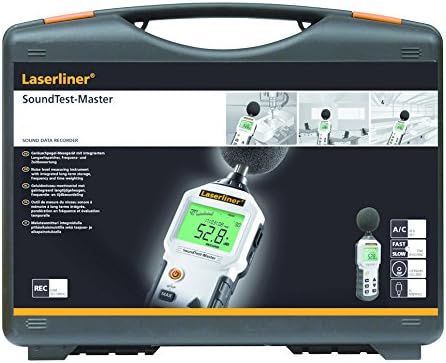
Kuva 3: The SoundTest-Master 082.070A stored in its protective carrying case.
Vianetsintä
| Ongelma | Mahdollinen syy | Ratkaisu |
|---|---|---|
| Laite ei käynnisty. | Tyhjät tai väärin asennetut paristot. | Vaihda paristot ja varmista oikea napaisuus. |
| Epätarkkoja lukemia. | Microphone obstructed or dirty; device needs calibration. | Clean microphone; perform calibration with a standard calibrator. |
| No data transfer to PC. | Incorrect cable connection; software not installed or configured. | Check RS232 cable connection; ensure PC software is correctly installed and running. |
| Näyttö on himmeä tai lukukelvoton. | Low battery power; display backlight off. | Replace batteries; check device settings for backlight control. |
Tekniset tiedot
| Ominaisuus | Yksityiskohta |
|---|---|
| Mallin nimi | SoundTest-Master |
| Osanumero | 082.070A |
| Valmistaja | Umarex |
| Merkki | Laserliner |
| Taajuuden painotus | dB(A), dB(C) |
| Aikapainotus | FAST (125 ms), SLOW (1 second) |
| Datamuisti | 16,000 XNUMX mittauspistettä |
| Käyttöliittymä | Optoisolated RS232 |
| Analogiset lähdöt | DC ja AC |
| Kalibrointi | Adjustable with 94 dB / 1 kHz standard calibrator |
| Mikrofoni | Sensitive electret condenser with removable windshield |
| Näyttö | Illuminated, clear display |
| Tuotteen paino | 1.18 kiloa (2.6 puntaa) |
| Tuotteen mitat | 10.33 x 5.51 x 13.78 tuumaa |
| Materiaali | Metal (Frame, Barrel) |
| Väri | Musta ja harmaa |
| Paristot vaaditaan | Yes (not included, type not specified in data) |
Takuu ja tuki
For warranty information and technical support, please refer to the documentation included with your purchase or visit the official Laserliner websivusto.