
1. Johdanto
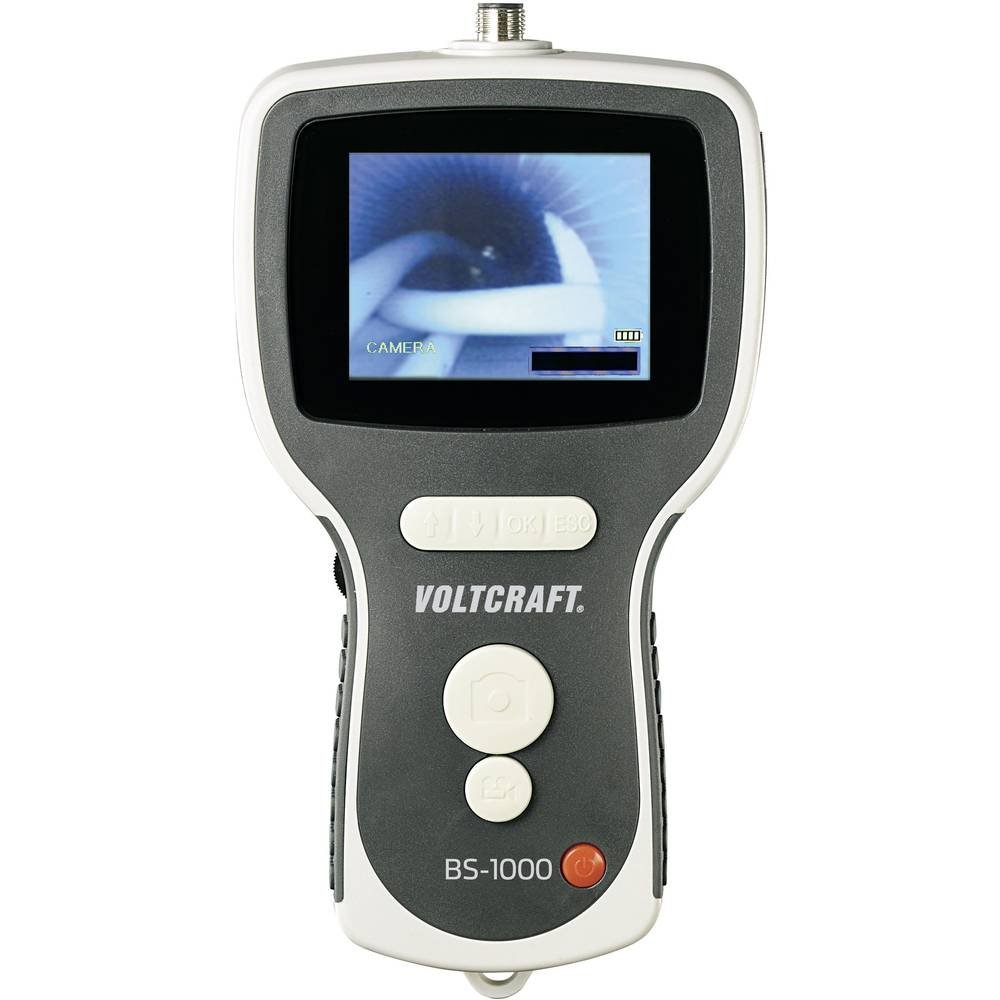
The VOLTCRAFT BS-1000T is a high-quality endoscope base unit designed for detailed visual inspection in various applications. It operates with a rechargeable battery and features a mini USB interface, a large 8.89 cm (3.5 inch) 320 x 240 pixel screen, an SD card slot, and a TV output. This base unit is compatible with various endoscope cameras, allowing for flexible use.
Keskeisiä ominaisuuksia ovat:
- 8.89 cm (3.5 inch) LCD screen
- Digitaalinen zoom-toiminto
- TV output for external display
- Video and photo recording capabilities
- Continuous brightness adjustment for the camera light
- Integrated LiPo battery for up to 4 hours of operation
- SD card support for media storage
- Tripod mounting thread for stable positioning
The VOLTCRAFT BS-1000T endoscope base unit, an SD card, and various accessories neatly organized within a black, hard-shell protective carrying case.
2. Turvallisuusohjeet
Lue ja ymmärrä kaikki turvallisuusohjeet ennen laitteen käyttöä. Näiden ohjeiden noudattamatta jättäminen voi aiheuttaa sähköiskun, tulipalon tai vakavan vamman.
- Pidä laite poissa vedestä ja kosteudesta.
- Älä yritä avata tai muokata laitetta. Jätä kaikki huoltotyöt pätevän henkilöstön tehtäväksi.
- Use only the specified power adapter for charging the integrated LiPo battery.
- Vältä altistamasta laitetta äärimmäisille lämpötiloille tai suoralle auringonvalolle.
- Ensure the endoscope camera probe is clean and undamaged before insertion into any area.
- Älä käytä laitetta ympäristöissä, joissa on räjähdysherkkiä kaasuja tai höyryjä.
- Pidä poissa lasten ulottuvilta.
3. Tuotteen osat
The BS-1000T endoscope base unit consists of the main display unit, control buttons, and connection ports. It is designed to be used with a compatible endoscope camera probe (sold separately or included in specific kits).
Pääyksikön ominaisuudet:
- 3.5 tuuman LCD-näyttö: Displays live video feed and recorded media.
- Ohjauspainikkeet: For power, menu navigation, zoom, brightness, and recording functions.
- Mini-USB-portti: Lataamiseen ja tiedonsiirtoon tietokoneelle.
- SD-korttipaikka: For storing videos and images.
- AV-lähtö: For connecting to an external display (e.g., TV).
- Kameran liitin: For attaching the flexible endoscope camera probe.
- Jalustan lanka: Sijaitsee pohjassa jalustaan kiinnittämistä varten.

The VOLTCRAFT BS-1000T endoscope base unit held in hand, with a flexible camera probe extending from its top. The unit's screen shows a live feed from the camera.
4. Asennus
4.1. Akun lataaminen
- Connect the provided USB cable to the mini USB port on the BS-1000T unit.
- Liitä USB-kaapelin toinen pää sopivaan USB-virtalähteeseen (ei sisälly toimitukseen) tai tietokoneen USB-porttiin.
- The charging indicator will illuminate. A full charge provides up to 4 hours of operation.
4.2. SD-kortin asettaminen
- Locate the SD card slot on the side of the BS-1000T unit.
- Insert a compatible SD card (up to 32GB, Class 10 recommended) into the slot with the metal contacts facing down until it clicks into place.
- Irrota SD-kortti painamalla sitä varovasti, kunnes se ponnahtaa ulos.
4.3. Connecting the Endoscope Camera
- Ensure the BS-1000T unit is powered off.
- Align the connector of the endoscope camera probe with the camera connector port on the top of the BS-1000T unit.
- Gently push and twist the connector to secure the camera probe. Do not force the connection.
5. Käyttö
5.1. Virta päälle / pois
- Käynnistääksesi laitteen, pidä virtapainiketta painettuna, kunnes näyttö syttyy.
- Sammuta virta pitämällä virtapainiketta painettuna, kunnes näyttö sammuu.
5.2. Videotallennus
- With the unit powered on and camera connected, press the Video Record button to start recording. A recording indicator will appear on the screen.
- Lopeta tallennus painamalla videon tallennuspainiketta uudelleen. Video file will be saved to the inserted SD card.
5.3. Kuvanotto
- Liven aikana view or video playback, press the Photo Capture button to take a still image.
- kuva file will be saved to the inserted SD card.
5.4. Zoomaustoiminto
- Press the Zoom button to digitally magnify the image on the screen.
- Repeated presses will cycle through different zoom levels.
5.5. Kirkkauden säätö
- Use the Brightness control buttons to adjust the intensity of the camera's LED lights.
- This allows for optimal illumination in various inspection environments.
5.6. Image Mirroring
- The device supports mirroring the displayed image. This feature is useful when using mirror attachments on the camera probe to correct the visual orientation.
- Refer to the on-screen menu for mirroring options.
5.7. TV Output
- Connect an AV cable (not included) from the AV output port on the BS-1000T unit to the AV input of a television or external monitor.
- The live feed or recorded media will be displayed on the external screen.

A close-up shot of the VOLTCRAFT BS-1000T endoscope's color LCD screen, showing a detailed image captured by the connected camera.

A person is shown holding the VOLTCRAFT BS-1000T endoscope base unit, with its flexible camera probe inserted into a sink drain for inspection. The unit's screen displays the live view from inside the drain.
6. Huolto
6.1. Puhdistus
- Pyyhi pääyksikkö pehmeällä, kuivalla liinalla. Älä käytä hankaavia puhdistusaineita tai liuottimia.
- For the camera probe, gently clean the lens with a lens cleaning cloth. If necessary, use a slightly damp liinalla ja varmista, että se on täysin kuiva ennen varastointia.
6.2. Varastointi
- Store the BS-1000T unit and its accessories in a cool, dry place, away from direct sunlight and extreme temperatures.
- Jos säilytät akkua pitkään, varmista, että se on osittain ladattu (noin 50 %) sen käyttöiän pidentämiseksi.
7. Vianmääritys
If you encounter issues with your VOLTCRAFT BS-1000T, please refer to the following common problems and solutions:
| Ongelma | Mahdollinen syy | Ratkaisu |
|---|---|---|
| Laite ei käynnisty. | Akku on tyhjä. | Lataa laite USB-kaapelilla. |
| Ei kuvaa näytöllä. | Camera probe not connected properly or faulty. | Ensure the camera probe is securely connected. Test with another compatible probe if available. |
| Cannot record video or capture images. | SD card is full, not inserted, or faulty. | Check if the SD card is inserted correctly. Delete old files or replace the SD card. Ensure the card is not write-protected. |
| Kuva on epäselvä tai epäselvä. | Camera lens is dirty or focus is incorrect. | Clean the camera lens. Adjust the focus type (manual focus for this model). |
| No output on external TV. | AV cable not connected correctly or TV input not selected. | Verify AV cable connection. Select the correct AV input source on your television. |
8. Tekniset tiedot
| Ominaisuus | Erittely |
|---|---|
| Merkki | VOLTCRAFT |
| Malli | BS-1000T |
| Väri | Musta |
| Näytön koko | 8.89 cm (3.5 tuumaa) |
| Videon resoluutio | 320 x 240 pikseliä |
| Yhteystekniikka | USB |
| Tuetut muodot | Video, Image |
| Yhteensopivat laitteet | Endoscope cameras |
| Tuotteen mitat (P x L x K) | 42 x 34 x 12 cm |
| Tuotteen paino | 450 grammaa |
| Zoomaustyyppi | Digitaalinen |
| Tarkennustyyppi | Manuaalinen |
| Tehokas Still-resoluutio | 320 pikseliä |
9. Takuu ja tuki
VOLTCRAFT products are designed for reliability and performance. For information regarding spare parts availability, please note that spare parts are guaranteed for 1 year from the date of purchase within the EU.
For further assistance, technical support, or warranty claims, please contact your retailer or visit the official VOLTCRAFT websivustolta yhteystiedot.