
1. Johdanto
This manual provides essential instructions for the safe and efficient operation of your Sharp CD-DH950P 240W Mini-Component System. This system features a 5-disc CD changer, a cassette deck, an iPod/iPhone docking station, a USB host for digital audio playback, and an AM/FM tuner. Please read this manual thoroughly before using the system and retain it for future reference.
2. Turvallisuustiedot
- Virtalähde: Liitä laite vain määritetyn voimakkuuden omaavaan pistorasiaantage.
- Ilmanvaihto: Varmista riittävä ilmanvaihto. Älä tuki tuuletusaukkoja.
- Vesi ja kosteus: Älä altista laitetta sateelle, kosteudelle tai tippuville/roiskeille nesteille.
- Lämpö: Pidä laite poissa lämmönlähteistä, kuten pattereista, lämmittimistä, liesistä tai muista lämpöä tuottavista laitteista.
- Puhdistus: Irrota laite pistorasiasta ennen puhdistamista. Käytä pehmeää, kuivaa liinaa.
- Huolto: Älä yritä huoltaa tätä tuotetta itse. Anna kaikki huoltotoimenpiteet pätevän huoltohenkilöstön tehtäväksi.
3. Pakkauksen sisältö
Varmista, että paketti sisältää seuraavat kohteet:
- Main Unit (CD-DH950P)
- Vasen kaiutin
- Oikea kaiutin
- Kaukosäädin paristoilla
- AM-silmukkaantenni
- FM-lanka-antenni
- Virtajohto
4. Asennus
4.1 Kaiuttimien kytkeminen
Connect the speaker wires from the main unit to the corresponding terminals on the back of each speaker. Ensure correct polarity (red to red, black to black) for optimal sound quality. The left speaker connects to the left speaker output, and the right speaker to the right speaker output.
4.2 Antennien kytkeminen
- FM-antenni: Connect the supplied FM wire antenna to the FM antenna terminal on the rear of the main unit. Extend the wire for better reception.
- AM-antenni: Connect the supplied AM loop antenna to the AM antenna terminals on the rear of the main unit. Position the antenna for best reception.
4.3 Virtaliitäntä
Plug the power cord into the AC IN jack on the rear of the main unit, then plug the other end into a standard AC wall outlet.
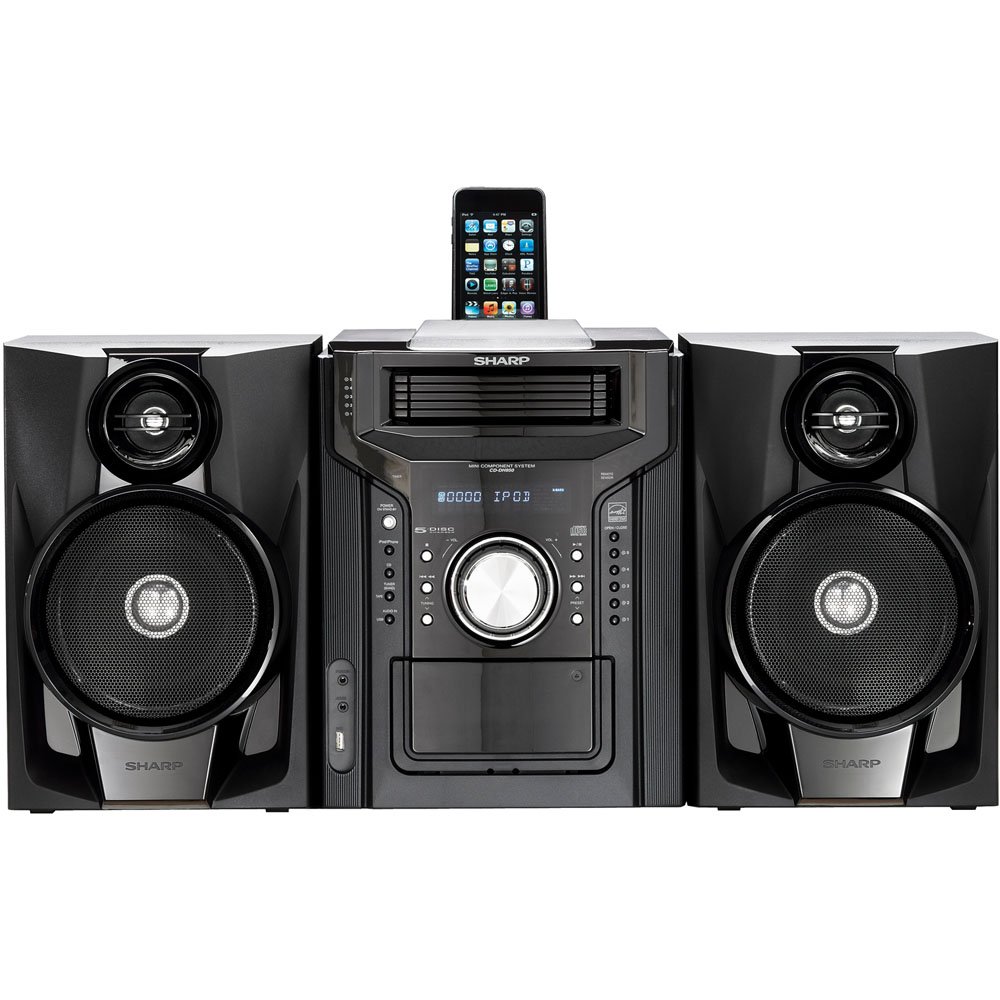
Kuva 4.3.1: Kaiken kaikkiaan view of the Sharp CD-DH950P Mini-Component System, showing the main unit flanked by two speakers, with an iPhone docked on top of the main unit.
5. Käyttöohjeet
5.1 Virta päälle/pois ja äänenvoimakkuuden säätö
- Paina POWER -painiketta etupaneelissa tai kaukosäätimessä laitteen käynnistämiseksi tai sammuttamiseksi.
- Kierrä VOLUME etupaneelin nuppia tai käytä VOL +/- kaukosäätimen painikkeilla äänenvoimakkuuden säätämiseksi.
5.2 CD-toisto
This system features a 5-disc CD changer.
- Paina AUKI/KIINNI -painiketta avataksesi CD-lokeron.
- Place up to five CDs on the disc trays, label side up.
- Paina AUKI/KIINNI uudelleen sulkeaksesi lokeron.
- Paina CD painiketta valitaksesi CD-toiminnon.
- Paina TOISTA/TAUKO -painiketta toiston aloittamiseksi.
- Käytä OHITA buttons to navigate between tracks or discs.
5.3 Kasettisoittimen käyttö
- Paina TAPE OPEN/CLOSE button to open the cassette deck.
- Aseta kasetti.
- Paina NAUHA -painiketta valitaksesi kasettitoiminnon.
- Paina PELATA aloittaaksesi toiston.
- To record, ensure the source is selected (e.g., CD, Tuner) and press the TALLENTAA button on the cassette deck.
5.4 iPod/iPhone-telakointi
The system includes a top-mounted docking slot for compatible iPod and iPhone devices (30-pin connector).
- Carefully place your iPod or iPhone into the docking slot.
- The system will automatically switch to iPod/iPhone mode or you may need to press the iPod / iPhone -painiketta.
- Use the system's controls or your device's controls to play music. The device will also charge while docked.
5.5 USB Host Playback
Connect a USB storage device containing MP3 or WMA audio files to the USB port on the front panel.
- Liitä USB-laite USB-porttiin.
- Paina USB button to select the USB function.
- Use the playback controls to navigate and play files.
5.6 AM/FM-viritin
- Paina VIRITIN painiketta valitaksesi AM- tai FM-radion.
- Käytä TUNING +/- painikkeita aseman manuaaliseen virittämiseen.
- To auto-scan, press and hold the TUNING +/- painikkeita.
- To store a preset, tune to the desired station, then press MUISTI ja sen jälkeen esiasetettu numero.
5.7 Äänitulo
Connect an external audio device (e.g., MP3 player, smartphone) to the AUDIO IN jack on the front panel using a 3.5mm stereo cable.
- Connect your device to the AUDIO IN jack.
- Paina ÄÄNI SISÄÄN -painiketta valitaksesi tämän lähteen.
- Ohjaa toistoa yhdistetystä laitteestasi.
6. Huolto
6.1 Laitteen puhdistaminen
Pyyhi laitteen ulkopinta pehmeällä, kuivalla liinalla. Älä käytä hankaavia puhdistusaineita, vahoja tai liuottimia. Varmista, että laite on irrotettu pistorasiasta ennen puhdistamista.
6.2 CD and Cassette Care
- Käsittele CD-levyjä reunoista välttääksesi sormenjälkiä ja naarmuja. Puhdista levyt pehmeällä, nukkaamattomalla liinalla keskeltä ulospäin.
- Store cassette tapes away from strong magnetic fields and direct sunlight.
7. Vianmääritys
| Ongelma | Mahdollinen syy | Ratkaisu |
|---|---|---|
| Ei virtaa | Virtajohto ei ole kytketty; pistorasia viallinen | Varmista, että virtajohto on tukevasti kytketty; Kokeile toista pistorasiaa |
| Ei ääntä | Äänenvoimakkuus liian alhainen; Kaiuttimia ei ole kytketty; Väärä lähde valittu | Increase volume; Check speaker connections; Select correct input source |
| CD-levy ei soi | Disc inserted incorrectly; Disc is dirty or scratched | Insert disc correctly (label side up); Clean or replace disc |
| Huono radiovastaanotto | Antenna not positioned correctly; Weak signal | Adjust position of AM/FM antennas; Try auto-tuning or manual fine-tuning |
| iPod/iPhone not charging/playing | Device not properly docked; Device not compatible (e.g., newer connector) | Re-dock the device; Note that this system uses a 30-pin connector, newer devices may require an adapter (not included) |
8. Tekniset tiedot
- Merkki: Terävä
- Malli: CD-DH950P
- Kokonaislähtöteho: 240 Watts RMS (85W/ch FTC)
- Kaiuttimen asetukset: 2.1 kanava
- Tuetut äänimuodot: CD, MP3, WMA
- Signaali-kohinasuhde: 100 dB
- Yhteensopivat laitteet: MP3 Player, Smartphone (via 30-pin dock or USB/Audio In)
- Mitat (P x L x K): 27.6 x 13.6 x 13.5 tuumaa
- Tuotteen paino: 24.4 puntaa
- UPC: 074000369863, 074000369290
9. Takuutiedot
This product is covered by a 1-year limited warranty from the date of purchase. Please refer to the warranty card included with your product for full terms and conditions, or contact Sharp customer service for details.
10. Tukea
For further assistance, technical support, or service inquiries, please contact Sharp customer service. Contact information can typically be found on the Sharp official websivustolla tai tuotteen mukana toimitetuissa dokumenteissa.