
Edifier M1360
Edifier M1360 Langallisen Multimediakaiutinjärjestelmän Käyttöohje
Malli: M1360
1. Johdanto
Kiitos ostoksestasiasing the Edifier M1360 Wired Multimedia Speaker System. This 2.1 speaker system is designed to provide a convenient and high-quality audio solution for various multimedia applications, including computers, laptops, gaming consoles, and MP3 players. Featuring upward-angled satellites and a downward-angled subwoofer, the system delivers clear sound with steady bass output. The wired remote control offers easy volume adjustment and includes a headphone jack for private listening.
2. Tärkeitä turvallisuustietoja
- Lue nämä ohjeet huolellisesti ennen tuotteen käyttöä.
- Säilytä tämä käyttöopas myöhempää tarvetta varten.
- Älä altista laitetta sateelle tai kosteudelle tulipalon tai sähköiskun välttämiseksi.
- Älä tuki tuuletusaukkoja. Asenna valmistajan ohjeiden mukaisesti.
- Älä asenna lähelle mitään lämmönlähteitä, kuten lämpöpattereita, lämpöpattereita, liesiä tai muita laitteita (mukaan lukien ampnostimet), jotka tuottavat lämpöä.
- Suojaa virtajohtoa kävelemiseltä tai puristumiselta, erityisesti pistokkeiden, pistorasian kohdalta ja kohdasta, jossa ne tulevat ulos laitteesta.
- Käytä vain valmistajan määrittelemiä lisälaitteita/lisävarusteita.
- Irrota tämä laite verkkovirrasta ukkosmyrskyjen aikana tai kun sitä ei käytetä pitkään aikaan.
- Anna kaikki huoltotoimenpiteet pätevän huoltohenkilöstön tehtäväksi. Huolto on tarpeen, jos laite on jollain tavalla vaurioitunut, kuten virtajohto tai pistoke on vaurioitunut, nestettä on roiskunut tai esineitä on pudonnut laitteen sisään, laite on altistunut sateelle tai kosteudelle, ei toimi normaalisti. , tai se on pudonnut.
3. Pakkauksen sisältö
Tarkista pakkauksen sisältö. Jos jokin puuttuu tai on vaurioitunut, ota yhteyttä jälleenmyyjään.
- 1x Edifier M1360 Subwoofer
- 2 x satelliittikaiuttimet
- 1x langallinen kaukosäädin
- 1x 3.5mm Audio Input Cable
- 1x Käyttöohje (tämä asiakirja)
4. Tuote ohiview
4.1 Järjestelmän osat
- subwoofer: Talot pääosassa amplifier and bass driver. Connects to the satellite speakers and the audio source.
- Satelliittikaiuttimet: Two compact speakers for mid-range and high-frequency audio.
- Langallinen kaukosäädin: Features a volume dial, power switch, and headphone output.
4.2 Komponenttien tunnistetiedot

Kuva 1: Etuosa view of the Edifier M1360 speaker system, showing the central subwoofer, two angled satellite speakers, and the wired remote control unit.
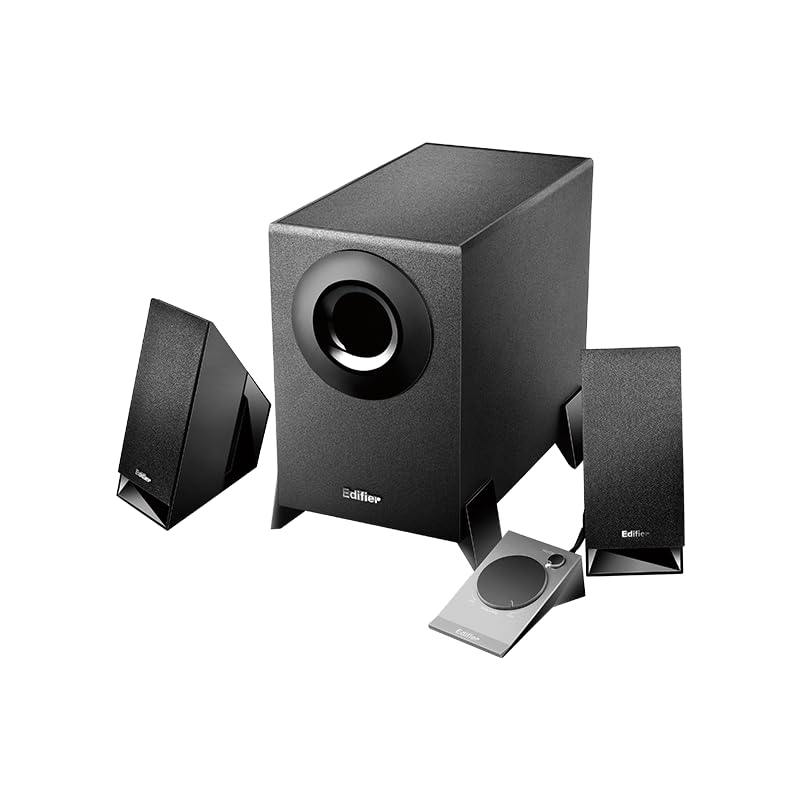
Figure 2: Another perspective of the Edifier M1360 speaker system, highlighting the compact design of the satellite speakers and the wired remote's placement.
5. Asennus
5.1 Sijoitus
- Place the subwoofer on the floor or a sturdy surface near your computer or audio source.
- Position the satellite speakers on either side of your monitor or listening area, ensuring they are angled towards you for optimal sound.
- Ensure adequate ventilation around all components.
5.2 Liitännät
- Connect the satellite speakers to the corresponding output jacks on the back of the subwoofer. Ensure the left and right speakers are connected correctly.
- Connect the wired remote control cable to the dedicated port on the subwoofer.
- Connect the 3.5mm audio input cable from the "AUDIO IN" port on the subwoofer to the audio output (headphone jack) of your computer, laptop, MP3 player, or other audio source.
- Plug the power cord of the subwoofer into a standard AC power outlet.
6. Käyttöohjeet
6.1 Virta päälle/pois
- To turn on the speaker system, press the power button located on the wired remote control. The power indicator light will illuminate.
- To turn off the speaker system, press the power button again. The power indicator light will turn off.
6.2 Äänenvoimakkuuden säätö
- Rotate the large dial on the wired remote control clockwise to increase the volume.
- Rotate the large dial counter-clockwise to decrease the volume.
6.3 Kuulokkeiden lähtö
- To listen privately, plug your headphones into the 3.5mm headphone jack on the wired remote control.
- When headphones are connected, the speaker output will automatically mute.
- Unplug the headphones to resume audio playback through the speakers.
7. Huolto ja hoito
- Puhdistus: Puhdista kaiuttimien ja subwooferin pinnat pehmeällä, kuivalla liinalla. Älä käytä nestemäisiä puhdistusaineita tai aerosolisuihkeita.
- Ilmanvaihto: Ensure that the ventilation openings on the subwoofer are not blocked. Proper airflow prevents overheating.
- Varastointi: Jos järjestelmää säilytetään pitkään, irrota se virtalähteestä ja säilytä sitä viileässä, kuivassa paikassa, poissa suorasta auringonvalosta ja äärimmäisistä lämpötiloista.
- Vältä kosteutta: Keep the speaker system away from water, humidity, and other liquids.
8. Vianmääritys
| Ongelma | Mahdollinen syy | Ratkaisu |
|---|---|---|
| Ei ääntä |
|
|
| Vääristynyt ääni |
|
|
| Yksi kaiutin ei toimi |
|
|
9. Tekniset tiedot
| Ominaisuus | Yksityiskohta |
|---|---|
| Mallin nimi | M1360 |
| Kaiuttimen tyyppi | Multimedia |
| Surround-äänikanavan asetukset | 2.1 |
| Yhteystekniikka | Wired (3.5mm stereo input) |
| Äänilähtötila | Stereot |
| Kaiuttimen suurin lähtöteho | 8.5 wattia |
| Subwooferin halkaisija | 5 tuumaa |
| Diskantin halkaisija | 1 tuumaa |
| Signaali-kohinasuhde | 85 dB |
| Taajuusvaste | 20 KHz (Note: This is likely the upper limit, not the full range. Common for speakers to list only max freq.) |
| Yhteensopivat laitteet | Smartphone, Laptop, Desktop, Gaming Console, MP3 Player |
| Tuotteen mitat | 6.4S x 11.2L x 14K senttimetriä |
| Tuotteen paino | 2.5 kg (2500 grammaa) |
| Virtalähde | AC |
| Väri | Musta |
| Alkuperämaa | Kiina |
10. Takuu ja tuki
For detailed warranty information and customer support, please refer to the warranty card included with your product packaging or visit the official Edifier websivusto.
Manufacturer: Edifier
Importer: Nikita Distributors - Green Terrace Building, Lane Number 5, South Koregaon Park, Pune 411001, MH, India
Ask a question about this manual
Ask about setup, troubleshooting, compatibility, parts, safety, or missing instructions. Manuals+ will review the question and use this page’s manual context to help answer it.