
Johdanto
The GIGABYTE GM-M7600 is a wireless precision optical mouse designed for comfortable and reliable use. This manual provides instructions for setting up, operating, maintaining, and troubleshooting your device.
Pakkauksen sisältö
Tarkista pakkauksen sisältö varmistaaksesi, että kaikki osat ovat mukana:
- GIGABYTE GM-M7600 Wireless Optical Mouse
- Portable Nano USB Receiver
- 2 x AAA-paristot
Asennus
1. Paristojen asentaminen
The GM-M7600 mouse requires two AAA batteries for operation. The batteries are included in the package.
- Paikanna hiiren pohjassa oleva paristolokeron kansi.
- Avaa lokero liu'uttamalla tai nostamalla kantta varovasti.
- Aseta kaksi AAA-paristoa lokeroon varmistaen, että positiiviset (+) ja negatiiviset (-) navat ovat oikein kohdistettuina lokeron sisällä olevien merkintöjen kanssa.
- Sulje paristolokeron kansi kunnolla.
2. USB-vastaanottimen kytkeminen
The mouse connects to your computer via a portable Nano USB receiver.
- Locate the Nano USB receiver. It may be stored inside the mouse's battery compartment or packaged separately.
- Plug the Nano USB receiver into an available USB port on your computer (Laptop or Personal Computer).
- Your operating system (e.g., Windows XP, Linux) should automatically detect and install the necessary drivers. This process may take a few moments.
- Kun ajurit on asennettu, hiiri on käyttövalmis.
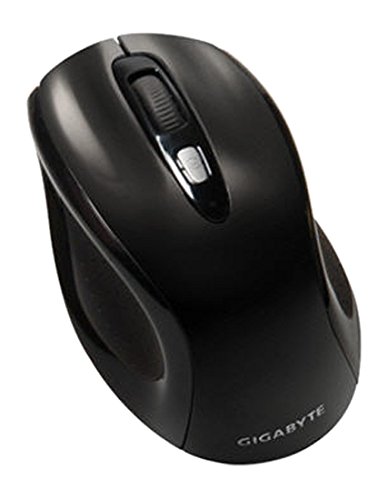
Kuva 1: GIGABYTE GM-M7600 Wireless Optical Mouse. This image displays the ergonomic design of the mouse, highlighting its form factor and the location of its buttons. The Nano USB receiver is typically stored within the mouse or connected to a computer's USB port.
Käyttöohjeet
1. Virta päälle / pois
The mouse typically has a power switch on its underside. Slide the switch to the 'ON' position to activate the mouse. Slide it to 'OFF' when not in use to conserve battery life.
2. DPI:n (herkkyyden) säätäminen
The GM-M7600 features an adjustable DPI switch, allowing you to change the mouse sensitivity between 800 DPI and 1600 DPI. This switch is usually located near the scroll wheel. Press the DPI button to toggle between the two sensitivity settings.
3. Hiiren perustoiminnot
- Vasen painallus: Ensisijainen painike kohteiden valitsemiseen, avaamiseen fileja vuorovaikutuksessa ohjelmistojen kanssa.
- Oikealla painikkeella: Toissijainen painike kontekstivalikoiden ja lisäasetusten käyttämiseen.
- Vierityspyörä: Käytetään asiakirjojen selaamiseen ja web sivuja. Se voi toimia myös keskimmäisenä napsautuspainikkeena.
Huolto
1. Puhdistus
Optimaalisen suorituskyvyn ja ulkonäön ylläpitämiseksi:
- Disconnect the mouse from your computer and turn off the power switch.
- Käytä pehmeää, nukkaamatonta liinaa hieman damppyyhi hiiren pinta vedellä tai miedolla puhdistusliuoksella.
- Vältä voimakkaiden kemikaalien, hankaavien puhdistusaineiden käyttöä tai nesteiden suihkuttamista suoraan hiireen.
- Clean the optical sensor area on the underside of the mouse with a dry cotton swab to remove any dust or debris.
2. Pariston vaihto
When the mouse performance degrades or it stops responding, it may be time to replace the batteries.
- Turn off the mouse using the power switch.
- Open the battery compartment as described in the 'Installing Batteries' section.
- Poista vanhat AAA-paristot.
- Aseta kaksi uutta AAA-paristoa paikoilleen ja huomioi oikea napaisuus (+/-).
- Sulje paristolokero ja kytke hiiri takaisin päälle.
Vianetsintä
If you encounter issues with your GIGABYTE GM-M7600 mouse, try the following solutions:
- Hiiri ei vastaa:
- Varmista, että hiiri on päällä.
- Tarkista, että paristot on asennettu oikein ja että niissä on riittävästi virtaa. Vaihda tarvittaessa.
- Ensure the Nano USB receiver is securely plugged into a working USB port on your computer. Try a different USB port.
- Käynnistä tietokone uudelleen.
- Kohdistimen epäsäännöllinen liike:
- Puhdista hiiren alapuolella oleva optinen anturi.
- Varmista, että käytät hiirtä sopivalla alustalla. Vältä voimakkaasti heijastavia tai läpinäkyviä pintoja.
- Check for any wireless interference. Move the mouse closer to the receiver or away from other wireless devices.
- DPI switch not working:
- Varmista, että hiiri on päällä ja kytketty.
- Paina DPI-painiketta lujasti.
Tekniset tiedot
| Mallin nimi | GM-M7600 |
| Merkki | GIGABYTE |
| Yhteystekniikka | 2.4 GHz:n radiotaajuus langaton |
| Liiketunnistus | Optinen |
| Säädettävä DPI | 800/1600 DPI |
| Painikkeiden lukumäärä | 3 (Vasen, Oikea, Vierityspyörä/Keskimmäinen napsautus) |
| Virtalähde | 2 x AAA paristot (mukana) |
| Vastaanottimen tyyppi | Portable Nano USB Receiver |
| Yhteensopivat laitteet | Kannettava tietokone, henkilökohtainen tietokone |
| Käyttöjärjestelmän tuki | Linux, Windows XP |
| Kotelon materiaali | Plastic with Rubberized Finish |
| Väri | Musta |
Takuu ja tuki
For warranty information and technical support, please refer to the warranty card included with your product or visit the official GIGABYTE websivusto. Säilytä ostokuitti takuuvaatimuksia varten.