
Johdanto
Welcome to the Greenlee DM-810A True RMS Digital Multimeter user manual. This document provides essential information for the safe and effective operation, maintenance, and troubleshooting of your device. The DM-810A is designed for accurate measurement of AC/DC voltage, AC/DC current, resistance, capacitance, frequency, and continuity, making it a versatile tool for electrical professionals.
Turvallisuustiedot
Noudata näitä ohjeita varmistaaksesi mittarin turvallisen käytön ja huollon. Näiden varoitusten laiminlyönti voi johtaa vakavaan loukkaantumiseen tai kuolemaan.
- Always read and understand the entire instruction manual before using the meter.
- Älä ylitä minkään toiminnon enimmäissyöttörajoja.
- Ole varovainen, kun työskentelet voltagyli 30 V AC RMS, 42 V huippu tai 60 V DC. Nämä jännitteettagse aiheuttaa sähköiskuvaaran.
- Always use the proper terminals, function, and range for your measurements. The DM-810A features a Beep-Jack audible and visible warning to guard against improper A and mA terminal plug-in.
- Inspect test leads for damaged insulation or exposed metal before each use. Replace if damaged.
- Älä käytä mittaria, jos se näyttää vaurioituneelta tai jos kotelo on auki.
- Varmista, että akkukotelon kansi on suljettu kunnolla ennen käyttöä.
- Adhere to local and national safety codes. Use personal protective equipment (PPE) such as approved safety glasses and electrically insulated gloves when necessary.
Tuote loppuview
This section identifies the key parts and controls of your Greenlee DM-810A multimeter.

Kuva 1: Edessä view of the Greenlee DM-810A Digital Multimeter, showing the display, function selector dial, and input jacks.
- Näyttö: Large LCD for clear readings, often with dual display capability.
- Toimintovalitsin: Used to select the desired measurement function (e.g., V~, V-, A~, A-, Ω, CAP, Hz, Continuity).
- Tuloliittimet:
- COM: Yhteinen (negatiivinen) tulo kaikille mittauksille.
- VΩHz: Positiivinen tulo tilavuudelletage-, resistanssi-, taajuus- ja kapasitanssimittaukset.
- mAμA: Positiivinen syöte millimetrilleampere ja mikroampvirran mittaukset.
- A: Positive input for ampvirran mittaukset.
- Painikkeet:
- VALITSE: Toggles between functions on a single dial position (e.g., AC/DC voltage, diodi/jatkuvuus).
- ALUE: Manually selects measurement range or returns to auto-ranging.
- △: Delta function for relative measurements.
- PITÄÄ: Jäädyttää näytön nykyisen lukeman.
Asennus
Akun asennus
The Greenlee DM-810A requires batteries for operation. Refer to the back of the meter for the battery compartment. Use a screwdriver to open the compartment, insert the specified batteries (typically AA or 9V, check the compartment label), observing correct polarity, and then securely close the cover.
Mittajohtojen liittäminen
Varmista aina, että mittausjohdot on kytketty oikein ennen mittausten suorittamista.
- Työnnä musta testijohto liitäntään COM (yleinen) tuloliitin.
- Insert the red test lead into the appropriate positive input jack based on the measurement you intend to make:
- Voltage, resistance, capacitance, or frequency, use the VΩHz Jack.
- Millilleampere or microampere current, use the mAμA Jack.
- varten ampere current, use the A Jack.
- The meter's Beep-Jack feature will provide an audible and visible alert if the function selector is set to a current measurement (A or mA) but the test lead is incorrectly plugged into a voltage/resistance jack, or vice-versa. This helps prevent damage to the meter and ensures correct setup.
Käyttöohjeet
This section details how to perform various measurements with your DM-810A multimeter.
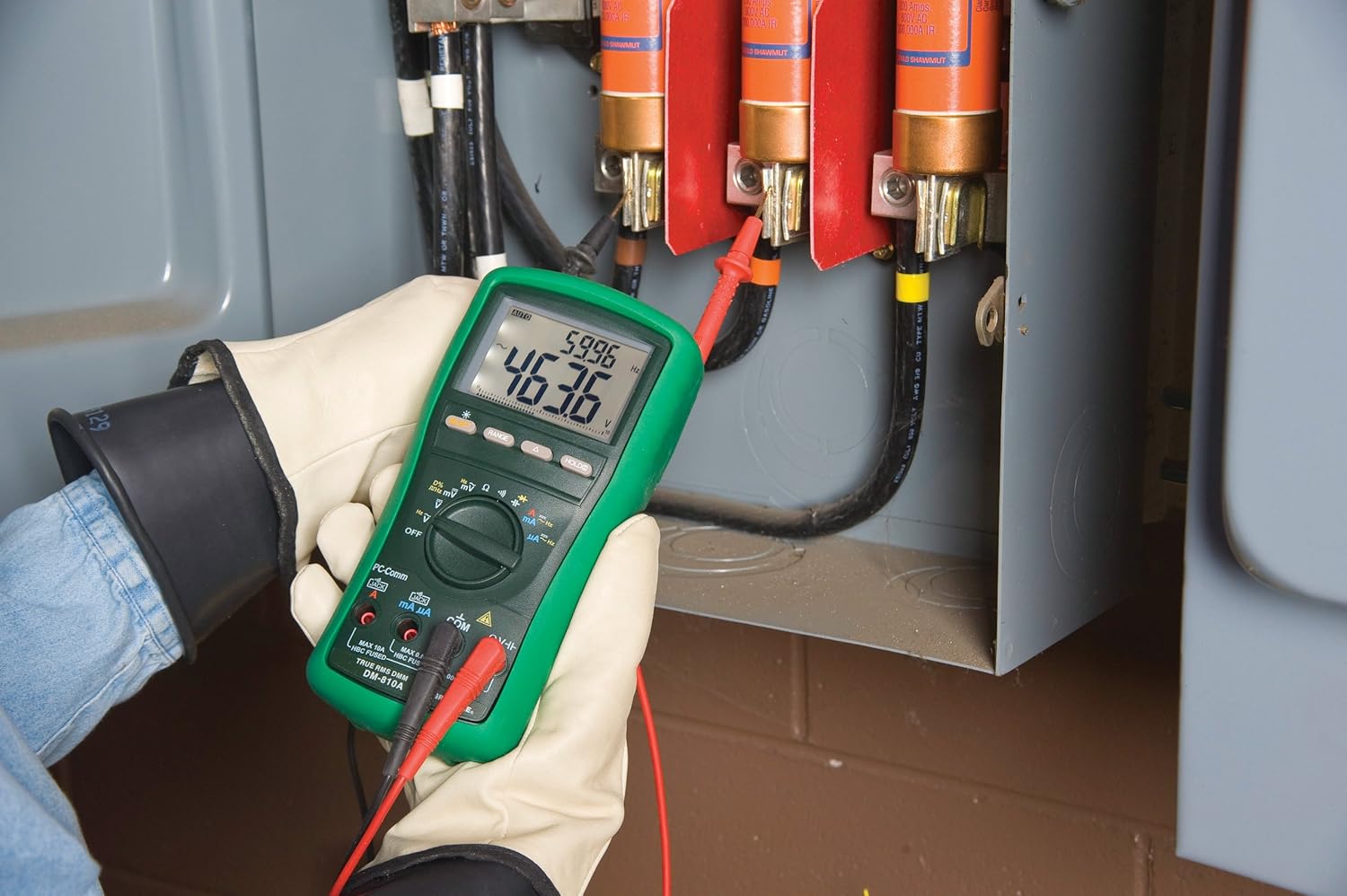
Kuva 2: The Greenlee DM-810A Digital Multimeter being used to take measurements within an electrical panel, demonstrating practical application.
Mittaus AC/DC Voltage
- Set the function selector to V~ (AC Voltage) tai V- (DC Voltage). Use the SELECT button to toggle if both are on one position.
- Liitä musta mittausjohto COM ja punainen testijohto VΩHz.
- Kytke mittausanturit rinnan mitattavan piirin tai komponentin poikki.
- Lue voltage -arvo näytössä.
AC/DC-virran mittaus
Tärkeää: Virtamittaukset edellyttävät mittarin kytkemistä sarjaan piirin kanssa. Varmista, että piiristä on katkaistu virta ennen mittarin kytkemistä.
- Katkaise virta piiristä.
- Set the function selector to A~ (AC Current) or A- (DC Current), or mA~ / mA-.
- Liitä musta mittausjohto COM. Connect the red test lead to mAμA for small currents or A for larger currents (up to 10A). The Beep-Jack warning will activate if leads are in the wrong jacks for the selected function.
- Open the circuit where the current is to be measured and connect the meter in series.
- Kytke virtapiiriin uudelleen virta ja lue virran arvo.
- De-energize the circuit before disconnecting the meter.
Resistanssin (Ω) mittaaminen
- De-energize the circuit or component.
- Set the function selector to Ω.
- Liitä musta mittausjohto COM ja punainen testijohto VΩHz.
- Kytke mittausanturit komponentin poikki.
- Lue vastuksen arvo.
Measuring Capacitance (CAP)
- Varmista, että kondensaattori on täysin purkautunut ennen mittausta.
- Set the function selector to CAP.
- Liitä musta mittausjohto COM ja punainen testijohto VΩHz.
- Kytke mittausjohdot kondensaattorin liittimiin.
- Lue kapasitanssin arvo.
Measuring Frequency (Hz)
- Set the function selector to Hz.
- Liitä musta mittausjohto COM ja punainen testijohto VΩHz.
- Kytke mittausjohdot signaalilähteen liittimiin.
- Lue taajuuden arvo.
Jatkuvuustesti
- De-energize the circuit or component.
- Set the function selector to the continuity symbol (often shared with diode test, use SELECT to toggle).
- Liitä musta mittausjohto COM ja punainen testijohto VΩHz.
- Kytke mittausanturit virtapiirin reitin tai komponentin poikki.
- Äänimerkki ilmaisee jatkuvuuden (matala resistanssi). Näytöllä näkyy resistanssin arvo.
Huolto
Puhdistus
Pyyhi mittari mainoksellaamp liinalla ja miedolla pesuaineella. Älä käytä hankaavia aineita tai liuottimia. Varmista, että mittari on täysin kuiva ennen käyttöä.
Akun vaihto
When the battery indicator appears on the display, replace the batteries immediately to ensure accurate readings. Follow the battery installation steps outlined in the Setup section.
Sulakkeen vaihto
If the current measurement functions cease to work, the internal fuses may need replacement. Refer to the meter's internal diagram (usually accessible by opening the battery compartment or back casing) for fuse specifications and replacement instructions. Always replace fuses with those of the specified type and rating to maintain safety and performance.
Vianetsintä
This section provides solutions for common issues encountered during the operation of your DM-810A multimeter.
| Ongelma | Mahdollinen syy | Ratkaisu |
|---|---|---|
| Ei näyttöä tai himmeä näyttö | Tyhjät tai vähissä akut | Vaihda paristot. |
| Väärät lukemat | Incorrect function/range selected; Damaged test leads; External interference | Verify function and range; Inspect and replace test leads; Move away from strong electromagnetic fields. |
| Virran mittaus ei toimi | Blown fuse; Incorrect lead connection | Check and replace fuses; Ensure leads are in the correct A or mA jacks. |
| Beep-Jack warning active | Test leads connected to incorrect input jacks for the selected function | Adjust test lead connections to match the selected function on the dial. |
| Continuity test not beeping | Open circuit; High resistance | Ensure the circuit is closed; Check for breaks in the circuit or component. |
Tekniset tiedot
The following table outlines the key technical specifications for the Greenlee DM-810A Digital Multimeter.
| Ominaisuus | Arvo |
|---|---|
| Merkki | Greenlee |
| Malli | DM-810A |
| Mittaustyyppi | Todellinen RMS digitaalinen yleismittari |
| Virtalähde | Paristokäyttöinen |
| Tyyli | Digitaalinen |
| Tuotteen paino | 16 unssia (1 kiloa) |
| Tuotteen mitat (P x L x K) | 10 x 10 x 12 tuumaa |
| Sertifikaatit | CE, CSA, UL |
| UPC | 783310087434 |
Takuu ja tuki
Takuutiedot
The Greenlee DM-810A Digital Multimeter comes with a 1 vuoden valmistajan takuuTämä takuu kattaa materiaali- ja valmistusvirheet normaalissa käytössä. Säilytä ostokuitti takuuvaatimuksia varten.
Asiakastuki
For technical assistance, warranty service, or to inquire about replacement parts, please contact Greenlee customer support. Refer to the official Greenlee webKatso ajantasaisimmat yhteystiedot sivustolta tai tuotepakkauksesta.