
1. Johdanto
This manual provides detailed instructions for the installation, operation, and maintenance of the ASUS M4A87TD EVO motherboard. This ATX motherboard supports AMD Phenom II, Athlon II, and Sempron 100 Series Processors with an AM3 socket, offering robust performance for personal computer systems. Key features include AMD 870 & SB850 chipset, DDR3 memory support, CrossFireX technology, SATA 6Gb/s, and USB 3.0 connectivity.
2. Asennus ja asennus
Oikea asennus on ratkaisevan tärkeää järjestelmän vakaan toiminnan kannalta. Noudata näitä ohjeita huolellisesti.
2.1 Emolevyn asetteluview
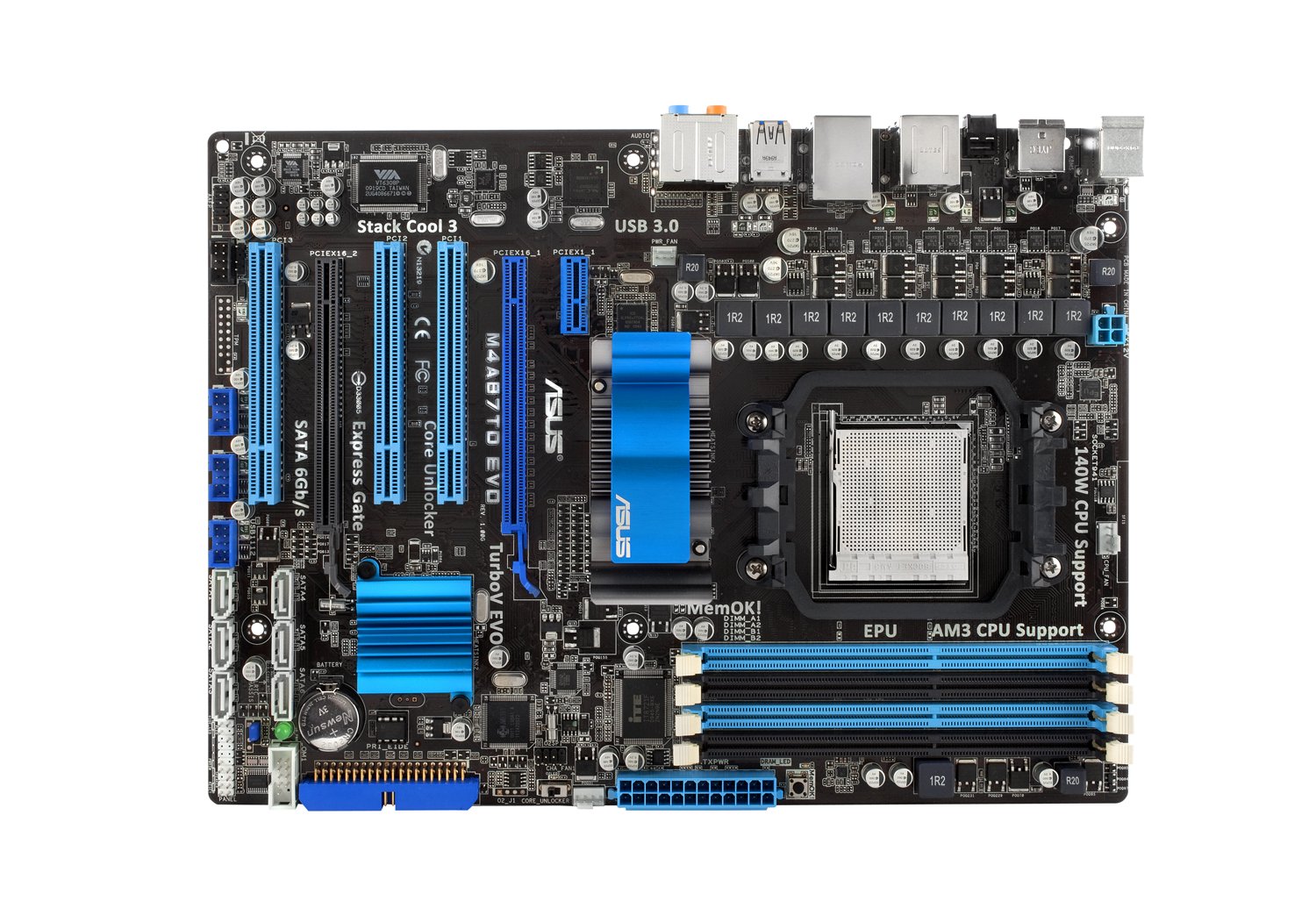
Kuva 1: Täysi view of the ASUS M4A87TD EVO Motherboard, highlighting various components and connectors.
2.2 CPU:n asennus
The motherboard features an AM3 socket for compatible AMD processors. Ensure the CPU is correctly oriented before placing it into the socket.
- Paikanna emolevyn CPU-liitäntä.
- Nosta pistorasian sivussa olevaa kuormausvipua.
- Kohdista suorittimen kolmiomainen merkki vastaavaan merkkiin kannassa.
- Aseta suoritin varovasti kantaan pakottamatta sitä.
- Laske kuormausvipu kiinnittääksesi suorittimen paikalleen.
Kuva 2: Yksityiskohtainen view of the AM3 CPU socket area on the motherboard.
2.3 Muistin (RAM) asennus
The motherboard supports up to 16GB of DDR3 memory across four DIMM slots. For dual-channel operation, install memory modules in matched pairs.
- Avaa DIMM-paikan molemmissa päissä olevat pidikkeet.
- Kohdista muistimoduulin lovi DIMM-paikan kiilan kanssa.
- Paina muistimoduulin molempia päitä lujasti alas, kunnes klipsit napsahtavat paikoilleen.
Kuva 3: View of the four DDR3 DIMM slots for memory installation.
2.4 Laajennuskortin asennus
The motherboard includes two PCI-Express 2.0 x16 slots (supporting ATI CrossFireX), one PCI-Express 2.0 x1 slot, and three PCI slots.
- Select an appropriate expansion slot for your card (e.g., graphics card in a PCIe x16 slot).
- Remove the corresponding slot cover from your computer case.
- Aseta kortti korttipaikkaan ja paina sitä lujasti alaspäin, kunnes se on paikallaan.
- Kiinnitä kortti koteloon ruuvilla.
Figure 4: Expansion slots including PCI-Express x16, x1, and standard PCI slots.
2.5 Tallennuslaitteen liitäntä
Connect SATA 6Gb/s (SATA3) and SATA 3Gb/s (SATA2) devices to the available ports.
- Identify the SATA 6Gb/s ports (typically labeled SATA6G_1, SATA6G_2) and SATA 3Gb/s ports.
- Connect one end of the SATA data cable to the motherboard port and the other end to your storage device (HDD/SSD).
- Ensure the storage device also receives power from the power supply unit.
Figure 5: SATA 6Gb/s and SATA 3Gb/s ports for connecting storage devices.
2.6 Virtaliitännät
Connect the main 24-pin ATX power connector and the 4-pin ATX 12V power connector from your power supply unit to the motherboard.
- 24-nastainen ATX-virtaliitin: Provides main power to the motherboard.
- 4-nastainen ATX 12 V virtaliitin: Tarjoaa lisätehoa suorittimelle.
2.7 Takaosan I/O-paneelin liitännät
Connect peripheral devices to the rear input/output ports.
- PS/2-portit: For keyboard and mouse.
- USB 2.0/3.0 -portit: For various USB devices.
- eSATA2 Port: For external SATA devices.
- IEEE 1394 Ports: For FireWire devices.
- RJ45 LAN-portti: Verkkoyhteyttä varten.
- Audio I/O Jacks: For speakers, microphone, and other audio devices.
- Optical S/PDIF Out: Digitaalista äänilähtöä varten.
Figure 6: Rear I/O panel showing various connectivity options including USB 3.0, LAN, and audio ports.
3. Käyttöohjeet
After successful hardware installation, proceed with system startup and software configuration.
3.1 Ensimmäinen käynnistys ja BIOS-asetukset
- Liitä näyttö, näppäimistö ja hiiri.
- Käynnistä tietokoneesi.
- Paina DEL key during startup to enter the BIOS setup utility.
- Configure essential settings such as boot order, date, and time.
- Explore advanced features like Core Unlocker ja TurboV EVO for performance tuning, if desired. Refer to the BIOS utility for detailed explanations of each setting.
- Tallenna muutokset ja sulje BIOS.
3.2 Käyttöjärjestelmän asennus
Install your preferred operating system (e.g., Windows 10) from a bootable USB drive or optical disc.
3.3 Ohjaimen asennus
Install the necessary drivers for the motherboard components, including chipset, LAN, audio, and USB 3.0 drivers. These are typically provided on a support DVD or available for download from the ASUS websivusto.
4. Huolto
Regular maintenance helps ensure the longevity and stability of your motherboard.
- Pölynpoisto: Puhdista emolevy ja komponentit säännöllisesti pölystä paineilmalla. Varmista, että järjestelmä on sammutettu ja irrotettu pistorasiasta ennen puhdistamista.
- BIOS-päivitykset: Tarkista ASUS-tuki website for the latest BIOS updates. Updating the BIOS can improve compatibility and system stability. Follow the instructions provided by ASUS carefully during the update process.
- Komponenttien tarkastukset: Ensure all cables and components are securely seated. Loose connections can lead to intermittent issues.
5. Vianmääritys
Tässä osiossa käsitellään yleisiä ongelmia, joita saatat kohdata.
- Järjestelmä ei käynnisty:
- Verify all power supply connections to the motherboard (24-pin ATX and 4-pin ATX 12V).
- Varmista, että virtalähdeyksikkö on kytketty päälle.
- Tarkista etupaneelin virtakytkimen liitännät emolevyyn.
- Ei näyttöä:
- Varmista, että näytönohjain on oikein paikallaan PCIe-paikassa ja että sillä on riittävästi virtaa.
- Check monitor connections and ensure the monitor is powered on and set to the correct input.
- If using integrated graphics (if available on your CPU/APU, though this board requires a discrete GPU), ensure the display cable is connected to the motherboard's video output.
- Memory (RAM) Issues:
- The motherboard features a DRAM LED that illuminates if there is an issue with memory detection.
- Reseat memory modules firmly in their slots.
- Test with one memory module at a time to identify a faulty stick or slot.
- Operating System Instability:
- Varmista, että kaikki ajurit on asennettu oikein ja ajan tasalla.
- Check for overheating issues by monitoring CPU and chipset temperatures.
- Suorita muistidiagnostiikkatyökalut RAM-virheiden tarkistamiseksi.
- USB Ports Remain Powered After Shutdown:
- This is a known characteristic for some configurations. To fully power off USB devices, either toggle the power supply switch off and on, or unplug and replug the power cable from the wall.
6. Tekniset tiedot
| Ominaisuus | Yksityiskohta |
|---|---|
| Merkki | ASUS |
| Mallinumero | M4A87TD EVO |
| CPU-liitäntä | Liitäntä AM3 |
| Yhteensopivat prosessorit | AMD Phenom II / Athlon II / Sempron 100 Series |
| Piirisarjan tyyppi | AMD 870 & SB850 |
| RAM-muistitekniikka | DDR3 2000(O.C.)/1600/1333/1066 |
| Muistipaikat saatavilla | 4 (Dual Channel, ECC/Non-ECC Un-buffered) |
| RAM-muistin enimmäiskoko | 16 Gt |
| Grafiikkakortin käyttöliittymä | PCI, PCI Express (2x PCIe 2.0 x16, 1x PCIe 2.0 x1, 3x PCI) |
| Tuettu järjestelmäväylän standardi | SATA 6Gb/s (SATA 3) |
| SATA-porttien kokonaismäärä | 7 (6x SATA 6Gb/s, 1x eSATA2) |
| USB-portit | 12x USB 2.0 (6 takana, 6 liittimillä), 2x USB 3.0 (takana) |
| Ethernet-porttien lukumäärä | 1 (RTL8111E Gigabit LAN) |
| Audio | 8-Channel HD Audio, Optical S/PDIF Out |
| Virtaliitin | 1x 24-pin ATX, 1x 4-pin ATX 12V |
| Alusta | Windows 10 (yhteensopiva) |
| Tuotteen paino | 2.9 kiloa |
7. Takuutiedot
The ASUS M4A87TD EVO motherboard comes with a 3 vuoden takuu. For specific terms and conditions, please refer to the warranty card included with your product or visit the official ASUS support websivusto.
8. Tukea
For technical assistance, driver downloads, or further information, please visit the official ASUS support website. You can typically find support resources by searching for your product model, M4A87TD EVO, on the ASUS websivusto.
ASUS-virallinen Websivusto: https://www.asus.com/support/