
1. Johdanto
This manual provides detailed instructions for the installation, operation, maintenance, and troubleshooting of the ASRock P55 DELUXE3 motherboard. Please read this manual thoroughly before installing or using your new motherboard to ensure proper setup and optimal performance. This motherboard supports Intel LGA1156 processors and features advanced technologies such as SATA3 and USB 3.0.
2. Tuotteen ominaisuudet
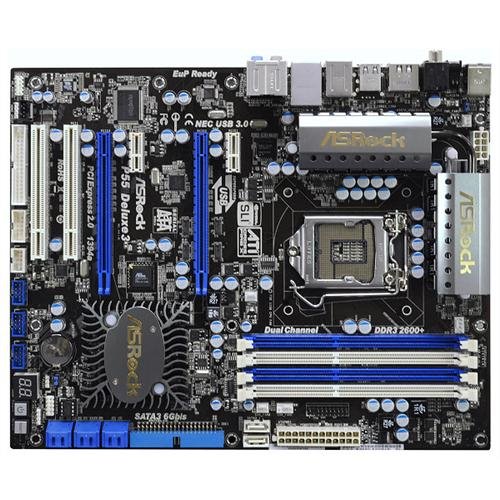
The ASRock P55 DELUXE3 motherboard is designed with the following key features:
- CPU-tuki: Socket 1156 for Intel Core i7/i5/i3 and Pentium G6950 Processors, including Intel Turbo Boost and Hyper-Threading Technology.
- Piirisarja: Intel P55.
- Muisti: 4x 240-pin DDR3 DIMM slots, supporting up to 16 GB of non-ECC, un-buffered dual-channel memory at speeds up to 2600+(OC)/2133(OC)/1866(OC)/1600/1333/1066 MHz.
- Laajennuspaikat: 2x PCI-Express 2.0 x16 slots (supporting ATI Quad CrossFireX and nVidia Quad SLI Technology), 2x PCI-Express 2.0 x1 slots, and 2x PCI slots.
- Varastointi: 1x ATA-133 channel, 2x SATA3 ports (supporting RAID 0, 1), and 6x SATA2 ports (supporting RAID 0, 1, 5, 10, JBOD).
- Audio: VIA VT2020 7.1-Channel Audio CODEC.
- LAN: Realtek RTL8111DL PCI-Express x1 Gigabit Ethernet Controller.
- USB-portit: 12x USB 2.0 ports (5 rear, 6 by headers, 1 by Powered eSATA3/USB Connector) and 2x USB 3.0 ports.
- Muut portit: 1x IEEE 1394 Port, 2x PS/2 Ports, 1x RJ45 LAN Port, 1x Coaxial SPDIF Out Port, 1x Optical SPDIF Out Port, and Audio I/O Jacks.
3. Asennusopas
Follow these steps for the proper installation of your ASRock P55 DELUXE3 motherboard and associated components.
3.1 Pakkauksesta purkaminen ja tarkastus
Carefully remove the motherboard from its packaging. Inspect for any visible damage. Ensure all accessories listed in the product packaging are present.
3.2 Component Preparation
- CPU:n asennus: Open the LGA 1156 CPU socket lever. Align the CPU with the socket, ensuring the gold triangle on the CPU matches the triangle on the socket. Gently place the CPU into the socket without force. Close the lever to secure the CPU.
- CPU-jäähdyttimen asennus: Apply thermal paste to the CPU if not pre-applied on the cooler. Mount the CPU cooler according to its specific instructions, ensuring it is securely fastened and making good contact with the CPU.
- Muistin (RAM) asennus: Open the clips on both ends of the DDR3 DIMM slots. Align the memory module with the slot, ensuring the notch on the module matches the key in the slot. Press down firmly on both ends of the module until the clips snap into place. For dual-channel operation, refer to the motherboard layout for recommended slot pairings.
- Graphics Card (Optional): If installing a dedicated graphics card, open the retention clip on the PCI-Express 2.0 x16 slot. Align the card with the slot and press firmly until it is seated. Secure the card with a screw to the chassis.
3.3 Emolevyn asennus runkoon
Install the I/O shield into the rear opening of your computer case. Carefully place the motherboard into the chassis, aligning the screw holes on the motherboard with the standoffs in the case. Secure the motherboard with screws.
3.4 Liitäntäkaapelit
Liitä seuraavat kaapelit:
- Virtapistokkeet: Kytke virtalähteen 24-nastainen ATX-päävirtaliitin ja 8-nastainen CPU-virtaliitin emolevyn vastaaviin portteihin.
- SATA-datakaapelit: Connect your storage devices (HDDs, SSDs, optical drives) to the SATA2 or SATA3 ports on the motherboard.
- Etupaneelin liittimet: Kytke virtapainike, nollauspainike, kiintolevyn merkkivalo, virran merkkivalo ja etupaneelin USB/ääniliitännät emolevyn vastaaviin nastoihin. Katso emolevyn kaaviosta oikeat nastojen järjestykset.
- Tuulettimen liittimet: Connect CPU fan and chassis fans to the appropriate fan headers.
4. Käyttöohjeet
After physical installation, proceed with the initial boot and software setup.
4.1 Ensimmäinen käynnistys ja BIOS-asetukset
Power on your system. Press the designated key (usually DEL or F2) during startup to enter the BIOS/UEFI setup utility. In the BIOS, you can configure boot order, system time, and various hardware settings. Ensure your storage devices are detected and set the primary boot device.
4.2 Käyttöjärjestelmän asennus
Insert your operating system installation media (USB drive or DVD). Follow the on-screen prompts to install your preferred operating system. Ensure the system boots from the installation media.
4.3 Ohjaimen asennus
After the operating system is installed, install the necessary drivers for your motherboard. These typically include:
- Piirisarjan ajurit
- Audio Drivers (VIA VT2020)
- LAN Drivers (Realtek RTL8111DL Gigabit Ethernet)
- USB 3.0 -ajurit
- SATA/RAID Drivers (if using RAID configuration)
These drivers can usually be found on the ASRock support websivusto emolevysi mallille.
4.4 Lisäominaisuuksien hyödyntäminen
The ASRock P55 DELUXE3 supports advanced features:
- Quad CrossFireX & Quad SLI: For multi-GPU configurations, ensure your graphics cards are compatible and install the necessary drivers from AMD or NVIDIA.
- SATA3 (6Gb/s): Connect compatible SSDs to the SATA3 ports for maximum performance.
- USB 3.0: Utilize the blue USB 3.0 ports for high-speed data transfer with compatible devices.
5. Huolto
Säännöllinen huolto auttaa varmistamaan emolevyn pitkän käyttöiän ja vakaan toiminnan.
- Pölynpuhdistus: Puhdista tietokoneen kotelo säännöllisesti pölystä, erityisesti suorittimen jäähdyttimen, piirisarjan jäähdytyselementtien ja tuulettimen tuuletusaukkojen ympäriltä. Käytä paineilmaa parhaan tuloksen saavuttamiseksi. Varmista, että järjestelmä on sammutettu ja irrotettu pistorasiasta ennen puhdistamista.
- BIOS-päivitykset: Tarkista ASRock website for BIOS updates. BIOS updates can improve compatibility, stability, and performance. Follow ASRock's specific instructions for BIOS flashing carefully to avoid system damage.
- Ohjaimen päivitykset: Keep your motherboard drivers updated to the latest versions available on the ASRock support website. This can resolve issues and improve performance.
- Kaapelin hallinta: Ensure all cables are neatly routed to promote better airflow and prevent interference.
6. Vianmääritys
Tässä osiossa käsitellään yleisiä ongelmia, joita saatat kohdata.
6.1 Ei virtaa / Ei käynnistystä
- Varmista, että kaikki virtakaapelit (24-nastainen ATX, 8-nastainen CPU) on kytketty kunnolla emolevyyn ja virtalähteeseen.
- Varmista, että virtakytkin on 'ON'-asennossa.
- Tarkista etupaneelin virtapainikkeen liitäntä emolevyyn.
- Testaa virtalähde toisella järjestelmällä tai virtalähdetesterillä.
6.2 No Display / POST Errors
- Ensure the monitor is connected to the correct graphics output (either integrated or dedicated GPU).
- Aseta näytönohjain ja muistimoduulit uudelleen paikoilleen.
- Try booting with only one RAM stick installed, testing each stick individually.
- Clear the CMOS (Complementary Metal-Oxide-Semiconductor) by removing the CMOS battery for a few minutes or using the clear CMOS jumper (refer to motherboard diagram).
- Listen for beep codes from the motherboard speaker, which can indicate specific hardware issues. Consult the ASRock website for beep code interpretations.
6.3 Komponenttia ei havaittu
- Tallennusasemat: Check SATA data and power cable connections. Verify detection in BIOS. Ensure correct drivers are installed in the operating system.
- USB-laitteet: Try different USB ports. Ensure USB drivers are installed.
- Verkko: Check LAN cable connection. Ensure LAN drivers are installed. Verify network adapter is enabled in BIOS and operating system.
For further assistance, refer to the ASRock support websivustolla tai ota yhteyttä ASRockin tekniseen tukeen.
7. Tekniset tiedot
Detailed technical specifications for the ASRock P55 DELUXE3 motherboard:
| Luokka | Erittely |
|---|---|
| Merkki | ASRock |
| Mallinumero | P55 DELUXE3 |
| CPU-liitäntä | LGA 1156 |
| Yhteensopivat prosessorit | Intel Core i7/i5/i3, Intel Pentium |
| RAM-muistitekniikka | DDR3 |
| Muistipaikat saatavilla | 4 |
| RAM-muistin enimmäiskoko | 16 Gt |
| Muistin kellonopeus | 1066 MHz, 1333 MHz, 1600 MHz, 1866(OC) MHz, 2133(OC) MHz, 2600+(OC) MHz |
| Grafiikkakortin käyttöliittymä | PCI, PCI Express |
| SATA-portit | 2x SATA3 (6Gb/s), 6x SATA2 (3Gb/s) |
| IDE-portit | 1x ATA-133 Channel |
| USB 2.0 -portit | 12 (5 rear, 6 by headers, 1 by Powered eSATA3/USB) |
| USB 3.0 -portit | 2 (takana) |
| Audio | VIA VT2020 7.1-kanavainen äänikoodekki |
| LAN | Realtek RTL8111DL Gigabit Ethernet |
| Päävirtaliittimen tyyppi | 24-nastainen ATX, 8-nastainen CPU |
| S/PDIF-liittimen tyyppi | Optinen, koaksiaalinen |
| Muototekijä | ATX |
| ASIN | B003BTX2GG |
| GTIN | 04711140871998 |
8. Takuu ja tuki
ASRock provides a limited warranty for its motherboards. The specific terms and duration of the warranty may vary by region and retailer. Please retain your proof of purchase for warranty claims.
For technical support, driver downloads, BIOS updates, and detailed product information, please visit the official ASRock websivusto:
When contacting support, please have your motherboard model (P55 DELUXE3) and serial number ready.