
Master Lock 1500iD
Master Lock 1500iD Directional Combination Lock User Manual
Model: 1500iD
Johdanto
The Master Lock 1500iD Directional Combination Lock provides security for various applications such as school lockers, gym lockers, and cabinets. This padlock features a durable metal body, a hardened steel shackle for resistance against cutting and sawing, and an anti-shim locking mechanism for enhanced security. Its patented directional movement technology allows for a personalized combination using up, down, left, and right movements, offering a convenient and secure locking solution.
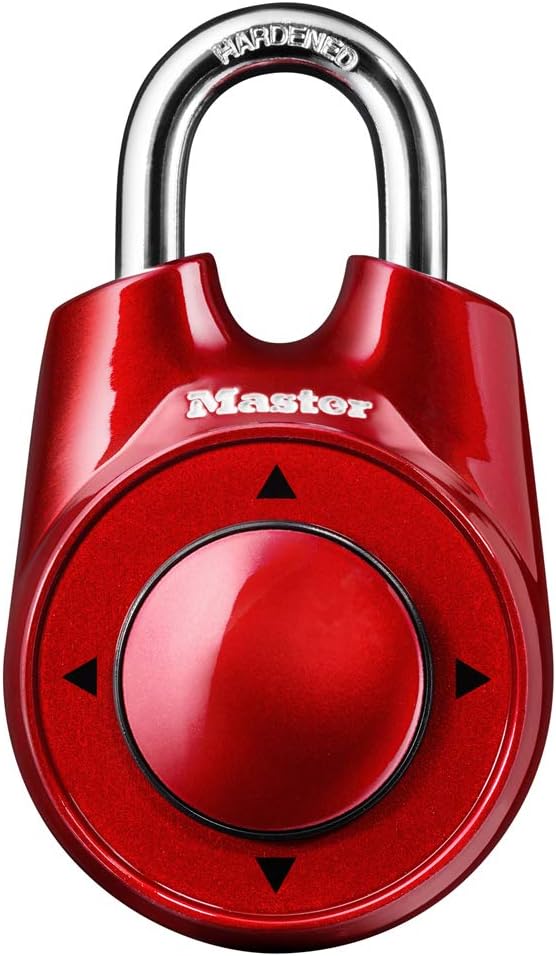
Kuva: Edessä view of the Master Lock 1500iD Directional Combination Lock, showcasing its red finish and directional dial.

Image: A blue Master Lock 1500iD highlighting key features: a hardened steel shackle for cut resistance, anti-shim technology for enhanced security, and the ability to set your own directional combination.
Asennus: Yhdistelmän asettaminen
Your Master Lock 1500iD comes with a factory-set combination. It is recommended to change this to a personal combination for improved security. Follow these steps to set your new directional combination:
- Place lock in the open position: Ensure the shackle is open and the lock is disengaged.
- Locate the reset lever: On the back of the lock, use a pointed object (e.g., a pen tip) to slide the reset lever into the "up" position (towards the "R" marking).
- Clear the mechanism: Insert the shackle into the lock body and squeeze firmly twice. This action clears any previous settings.
- Open the lock: Pull up on the shackle to open the lock again.
- Enter your new combination: With the shackle open, enter your desired new directional combination using the up, down, left, or right movements on the dial. Ensure these movements are precise.
- Slide reset lever back: Slide the reset lever back to the "down" position.
- Testaa uutta yhdistelmää: Insert the shackle into the lock and squeeze firmly. Scramble the dial. Then, enter your new combination to verify it opens the lock.
- Lock is ready: The lock will now open with your new combination. Remember your combination as there is no master key or override.

Image: A visual step-by-step guide illustrating the process of resetting the combination on the Master Lock 1500iD. It shows the lock in various stages of the reset procedure, from open to setting the new code.
Lukon käyttö
Lukon avaaminen
- Ensure the lock is in the closed position with the shackle engaged.
- Enter your personalized directional combination by moving the central dial up, down, left, or right in the correct sequence.
- After entering the combination, pull up on the shackle to release the lock.
Closing and Securing the Lock
- Align the shackle with the opening in the lock body.
- Push the shackle firmly into the lock body until it clicks into place.
- Scramble the directional dial to secure the lock and prevent accidental opening.

Kuva: esimamples of appropriate uses for the Master Lock 1500iD, including school lockers, gym lockers, and cabinets. It also clearly indicates that the lock is not suitable for outdoor use.
Huolto
The Master Lock 1500iD is designed for indoor use. To ensure optimal performance and longevity:
- Keep the lock clean and free from dust and debris. Wipe with a soft, dry cloth.
- Avoid exposing the lock to harsh weather conditions, extreme temperatures, or moisture, as this can affect the internal mechanism.
- Do not apply excessive force when operating the lock or entering the combination.
- Lubrication is generally not required for this type of lock. If the mechanism feels stiff, consult Master Lock support before applying any lubricants.
Vianetsintä
Lock Does Not Open
- Väärä yhdistelmä: Double-check that you are entering the correct directional sequence. Ensure each movement is distinct and fully registered.
- Incomplete Combination Entry: Make sure all steps of your combination are entered before attempting to open the lock.
- Shackle Not Fully Engaged: If the shackle was not fully pushed in when locking, it might not engage properly. Try pushing the shackle in firmly before re-entering the combination.
- Sisäinen tukos: If the lock mechanism feels jammed, ensure no foreign objects are obstructing the shackle or dial.
Unohdettu yhdistelmä
The Master Lock 1500iD is designed for user-set combinations and does not have a master key or a way to recover a forgotten combination. It is crucial to record your combination in a secure, memorable location. If the combination is forgotten, the lock may need to be replaced.
Tekniset tiedot
| Ominaisuus | Yksityiskohta |
|---|---|
| Merkki | Päälukko |
| Mallinumero | 1500iD |
| Lukon tyyppi | Directional Combination Lock |
| Rungon materiaali | Metalli |
| Kahvan materiaali | Karkaistu teräs |
| Kahvan halkaisija | 1/4 tuumaa (6 mm) |
| Kahvan pituus | 1 tuumaa (25 mm) |
| Rungon leveys | 2-1/8 tuumaa (54 mm) |
| Tuotteen mitat (P x L x K) | 1.13 x 2.13 x 3.88 tuumaa |
| Tuotteen paino | 5.9 unssia |
| Erikoisominaisuudet | Keyless, Anti-shim mechanism |

Image: A purple Master Lock 1500iD with detailed measurements indicating the shackle diameter (1/4in / 6mm), shackle length (1in / 25mm), body width (2-1/8in / 54mm), and overall height (3-5/8in / 92mm).
Takuutiedot
The Master Lock 1500iD Directional Combination Lock is backed by a Rajoitettu elinikäinen takuu. This warranty covers defects in material and workmanship for the life of the product. For specific terms and conditions, or to make a warranty claim, please refer to the official Master Lock websivustolla tai ota yhteyttä heidän asiakastukeen.
Tukea
For further assistance, technical support, or inquiries regarding your Master Lock 1500iD, please visit the official Master Lock website or contact their customer service department. You may find additional resources, FAQs, and contact information on their support pages.
Master Lockin virallinen Websivusto: www.masterlock.com
Ask a question about this manual
Ask about setup, troubleshooting, compatibility, parts, safety, or missing instructions. Manuals+ will review the question and use this page’s manual context to help answer it.