
1. Johdanto
Kiitos ostoksestasiasing the GPX CDP6806DT Personal CD Player. This manual provides important safety instructions, operational guidelines, and maintenance procedures to ensure optimal performance and longevity of your device. Please read this manual thoroughly before using the product and retain it for future reference.
2. Turvallisuustiedot
Tärkeitä turvallisuusohjeita
- Älä altista laitetta vedelle tai kosteudelle.
- Vältä laitteen sijoittamista lämmönlähteiden, kuten pattereiden, lämmitysventtiilien, liesien tai muiden laitteiden (mukaan lukien ampnostimet), jotka tuottavat lämpöä.
- Älä yritä purkaa tai muokata laitetta. Jätä kaikki huoltotyöt pätevän huoltohenkilöstön tehtäväksi.
- Use only the specified batteries (2 x AA batteries). Ensure correct polarity when inserting batteries.
- Poista paristot, jos laitetta ei käytetä pitkään aikaan.
- Vältä kuuntelemista pitkään suurella äänenvoimakkuudella kuulovaurioiden välttämiseksi.
- Puhdista laite vain kuivalla liinalla.
3. Pakkauksen sisältö
Carefully unpack your GPX CDP6806DT Personal CD Player and ensure all items are present:
- GPX CDP6806DT Personal CD Player
- Käyttöopas (tämä asiakirja)
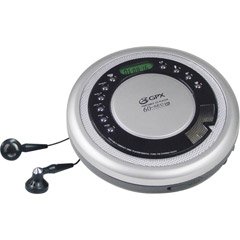
Figure 1: GPX CDP6806DT Personal CD Player. This image illustrates the compact design and general appearance of the device.
4. Säätimet ja ominaisuudet
Familiarize yourself with the controls and features of your GPX CDP6806DT for optimal use.
- LCD-näyttö: 6-digit display for track number, time, and FM frequency.
- TOISTA/TAUKO (►/−): Press to start or pause CD playback.
- PYSÄYTÄ (■): Paina pysäyttääksesi CD-levyn toiston.
- OHITA/HAE (◀◀/▶▶): Press to skip tracks. Hold to search within a track.
- ÄÄNENVOIMAKKUUS (+/-): Säätää äänen ulostulon tasoa.
- MODE/PROG: Selects playback mode (Repeat, Random) or programs CD tracks.
- FM TUNER (ON/OFF/BAND): Switches to FM radio mode, turns FM on/off, or changes FM band.
- ESIASETUS (+/-): Navigates saved FM radio presets.
- CD-lokero: Area for inserting audio CDs.
- Akkulokero: Located on the bottom, holds 2 AA batteries.
- Kuulokeliitäntä (3.5 mm): Yhdistää kuulokkeet yksityistä kuuntelua varten.
Figure 2: GPX CDP6806DT Controls Layout. This image provides a visual reference for the location of various buttons and ports on the device.
5. Asennus
5.1 Akun asennus
The GPX CDP6806DT requires two (2) AA batteries (not included) for portable operation.
- Paikanna paristolokero laitteen pohjasta.
- Liu'uta paristolokeron kansi auki.
- Aseta kaksi AA-paristoa lokeroon varmistaen oikean napaisuuden (+ ja -) lokeron sisällä olevien merkkien mukaisesti.
- Sulje paristolokeron kansi kunnolla.
5.2 Kuulokkeiden liittäminen
For private listening, connect your 3.5mm stereo headphones (not included) to the headphone jack located on the side of the unit.
6. Käyttöohjeet
6.1 CD-toisto
The unit supports CD and CD-R/RW disc formats.
- Open the CD compartment lid by gently pressing the OPEN button (if present, or lifting the lid).
- Aseta CD-levy etikettipuoli ylöspäin keskiakselille.
- Sulje CD-lokeron kansi tiiviisti, kunnes se napsahtaa.
- Paina TOISTA/TAUKO (►/−) -painiketta aloittaaksesi toiston. Kappaleen numero ja kulunut aika näkyvät LCD-näytössä.
- Keskeytä toisto painamalla TOISTA/TAUKO (►/−). Jatka painamalla uudelleen.
- Pysäytä toisto painamalla PYSÄYTÄ (■) -painiketta.
- Siirry seuraavaan kappaleeseen painamalla SKIP/SEARCH (▶▶).
- To go back to the beginning of the current track, press OHITA/HAE (◀◀) once. Press twice to go to the previous track.
- To search rapidly forward or backward within a track, hold down SKIP/SEARCH (▶▶) or (◀◀) vastaavasti.
- Säädä äänenvoimakkuutta ÄÄNENVOIMAKKUUS (+/-) valvontaa.
6.2 FM-radion käyttö
The unit features a digital FM tuner with station presets.
- Liu'uta FM -VIRITIN switch to the ON position or press the BAND -painiketta siirtyäksesi FM-tilaan.
- Paina SKIP/SEARCH (▶▶) or (◀◀) painikkeita virittääksesi manuaalisesti halutulle taajuudelle.
- To auto-scan and save stations, hold down the TOISTA/TAUKO (►/−) button (or refer to specific instructions for auto-scan if available on the device).
- To recall saved presets, use the ESIASETUS (+/-) painikkeita.
6.3 CD Programming (24-Track)
Voit ohjelmoida jopa 24 kappaletta toistettavaksi tietyssä järjestyksessä.
- With the CD stopped, press the MODE/PROG -painiketta. Näytössä vilkkuu "PROG".
- Käytä SKIP/SEARCH (▶▶) or (◀◀) -painikkeita valitaksesi ensimmäisen ohjelmoitavan kappaleen.
- Paina MODE/PROG again to confirm the selection. The display will show the program number and the next available program slot.
- Repeat steps 2 and 3 to add up to 24 tracks to your program.
- Kun olet ohjelmoinut kaikki haluamasi kappaleet, paina TOISTA/TAUKO (►/−) aloittaaksesi ohjelmoidun toiston.
- Tyhjennä ohjelma painamalla PYSÄYTÄ (■) painiketta kahdesti.
6.4 Anti-Skip Protection (ASP)
The GPX CDP6806DT features a 60-second Anti-Skip Protection system. This system buffers audio data to minimize interruptions caused by minor shocks or vibrations during CD playback. The ASP activates automatically when a CD is playing.
7. Huolto
7.1 Laitteen puhdistaminen
- Pyyhi laitteen ulkopinta pehmeällä, kuivalla liinalla.
- Älä käytä hankaavia puhdistusaineita, vahoja tai liuottimia.
- If the CD lens needs cleaning, use a specialized CD lens cleaner disc or a soft, lint-free cloth designed for optical lenses.
7.2 Akun hoito
- Poista paristot vuotojen estämiseksi, jos laitetta ei käytetä pitkään aikaan.
- Älä sekoita vanhoja ja uusia paristoja tai erityyppisiä paristoja.
- Hävitä käytetyt paristot vastuullisesti paikallisten määräysten mukaisesti.
8. Vianmääritys
If you experience issues with your GPX CDP6806DT, please consult the following table for common problems and solutions.
| Ongelma | Mahdollinen syy / Ratkaisu |
|---|---|
| Yksikkö ei käynnisty. | Check if batteries are inserted correctly with proper polarity. Ensure batteries are fresh and not depleted. |
| Kuulokkeista ei kuulu ääntä. | Ensure headphones are fully plugged into the headphone jack. Increase the volume level. Test with another pair of headphones. |
| CD-levy hyppii tai toisto keskeytyy. | Ensure the CD is clean and free of scratches or smudges. Clean the CD with a soft, lint-free cloth. Ensure the unit is on a stable surface or held steadily during use. |
| CD-levy ei soi. | Ensure the CD is inserted correctly with the label side up. Close the CD compartment lid completely. Check if the CD is a supported format (CD, CD-R/RW). |
| FM-radion kuuluvuus on heikko. | Extend the headphone cable as it acts as the antenna. Try moving to a different location. |
9. Tekniset tiedot
- Merkki: GPX
- Malli: CDP6806DT
- Tuetut levymuodot: CD, CD-R / RW
- Skip-suojaus: 60 sekuntia
- Näyttö: 6-numeroinen LCD-näyttö
- Radio: Digital FM Tuner with Presets
- CD Programming: 24-raitainen
- Virtalähde: 2 x AA-paristot (ei mukana)
- Liitettävyys: 3.5mm Headphone Jack (Auxiliary)
10. Takuu ja tuki
For detailed warranty information, please refer to the warranty card included with your original product packaging. For technical support, service inquiries, or to purchase replacement parts, please visit the official GPX websivustolta tai ota yhteyttä heidän asiakaspalveluunsa käyttämällä tuotedokumentaatiossa annettuja yhteystietoja.
Säilytä ostokuitti takuuvaatimuksia varten.