
1. Johdanto
This manual provides essential information for the safe and efficient operation of your Crosley WR18 Mini Bubbler Jukebox. Please read these instructions thoroughly before using the unit and retain them for future reference.
The Crosley WR18 is a reproduction of a 1946-style jukebox, featuring percolating bubble tubes, neon lights, a front-loading compact disc player, FM radio, and stereo speakers. It is operated primarily via a 12-button remote control.
2. Turvallisuusohjeet
- Älä altista laitetta sateelle tai kosteudelle.
- Älä tuki tuuletusaukkoja.
- Varmista, että laite on sijoitettu vakaalle, tasaiselle alustalle.
- Irrota laite verkkovirrasta ukkosmyrskyjen aikana tai kun sitä ei käytetä pitkään aikaan.
- Anna kaikki huoltotoimenpiteet pätevän huoltohenkilöstön tehtäväksi.
3. Asennus
3.1 Pakkauksesta purkaminen ja sijoittaminen
Carefully remove the jukebox from its packaging. Place the unit on a flat, stable surface away from direct sunlight, heat sources, and excessive dust or moisture. Ensure there is adequate space around the unit for ventilation.
3.2 Virtaliitäntä
Connect the AC power cord to the power input on the back of the unit, then plug it into a standard wall outlet. The unit is designed for 120V AC, 60Hz power supply.
3.3 Kaukosäätimen asetukset
Insert two AAA batteries (not included) into the remote control, observing the correct polarity. The remote control is essential for operating most functions of the jukebox.
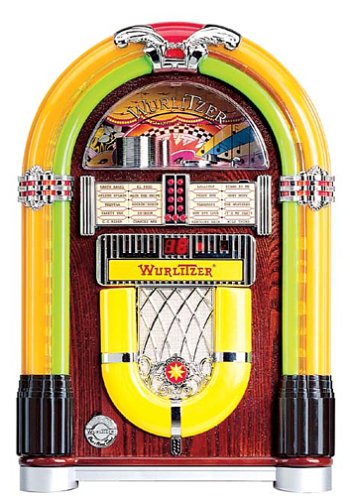
Kuva 1: Edessä view of the Crosley WR18 Mini Bubbler Jukebox. This image shows the main unit with its distinctive bubble tubes, neon lights, and speaker grilles. The CD player slot is visible below the main display area.
4. Käyttöohjeet
4.1 Virta päälle/pois
Paina POWER kaukosäätimen -painiketta laitteen käynnistämiseksi tai sammuttamiseksi.
4.2 CD-soittimen käyttö
- Paina CD button on the remote to select CD mode.
- Paina AUKI/KIINNI button on the remote to open the CD tray.
- Place a compact disc, label side up, into the tray.
- Paina AUKI/KIINNI uudelleen sulkeaksesi levykelkan. Laite alkaa lukea levyä.
- Käytä TOISTA/TAUKO -painiketta aloittaaksesi tai keskeyttääksesi toiston.
- Käytä OHITA ETEENPÄIN (|>>) tai OHITA TAAKSEPÄIN (<<|) -painikkeita kappaleiden välillä navigointiin.
- The OHJELMOIDA function allows you to create a custom playback order for tracks. Refer to the remote control diagram for specific programming steps.
- The TOISTAA function allows you to repeat the current track or the entire disc.
4.3 FM-radion käyttö
- Paina FM button on the remote to select FM radio mode.
- Extend the external FM antenna located at the back of the unit for optimal reception. Adjust its position for clearer sound.
- Käytä VIRITTÄÄ (+) tai VÄÄRITÄ (-) buttons on the remote to manually tune to desired radio stations.
4.4 Äänenvoimakkuuden säätö
Säädä äänenvoimakkuutta ÄÄNENVOIMAKKUUS YLÖS (+) ja ÄÄNENVOIMAKKUUS VÄHEMMÄN (-) buttons on the remote control. Note that all volume adjustments are made via the remote.
4.5 Neon Lights and Bubble Tubes
The genuine multicolored neon lights and percolating bubble tubes activate automatically when the unit is powered on, enhancing the retro aesthetic. There are no separate controls for these features.
5. Huolto
5.1 Kaapin puhdistus
Wipe the handcrafted hardwood cabinet with a soft, dry cloth. For stubborn marks, a slightly damp liinaa voidaan käyttää, minkä jälkeen pinta kuivataan välittömästi. Vältä hankaavia puhdistusaineita tai liuottimia.
5.2 CD-soittimen hoito
To ensure optimal performance, keep the CD tray and lens clean. Use a specialized CD lens cleaner disc periodically. Avoid touching the CD lens directly.
5.3 Bubble Tubes and Neon Lights
The bubble tubes and neon lights are sealed units and require no user maintenance. If any issues arise with these components, contact customer support.
6. Vianmääritys
| Ongelma | Mahdollinen syy | Ratkaisu |
|---|---|---|
| Ei virtaa | Virtajohto ei ole kytketty; pistorasia ei aktiivinen | Varmista, että virtajohto on kytketty kunnolla pistorasiaan; testaa pistorasiaa toisella laitteella. |
| Ei ääntä | Volume too low; incorrect mode selected | Increase volume using remote; ensure correct mode (CD/FM) is selected. |
| CD-levy ei soi | Disc inserted incorrectly; disc dirty/scratched; CD mode not selected | Reinsert disc correctly; clean disc; select CD mode. |
| Huono FM -vastaanotto | Antenna not extended/positioned correctly | Fully extend and adjust the external FM antenna. |
| Kaukosäädin ei toimi | Batteries depleted; line of sight blocked; remote malfunction | Replace batteries; ensure no obstructions between remote and unit; if remote remains unresponsive, contact customer support as many functions are remote-only. |
7. Tekniset tiedot
- Mallinumero: WR18
- Tuotteen mitat: 12 x 22 x 16 inches (Width x Height x Depth)
- Tuotteen paino: 16.8 kiloa
- Valmistaja: Crosley-radio
- Audio Ominaisuudet: Stereo sound with two 4-inch speakers and built-in ampelävämpi
- Median toisto: CD player with program and repeat functions, FM radio with external antenna
- Esteettiset ominaisuudet: Handcrafted hardwood cabinet, genuine multicolored neon lights, bubble tube accents
- Ohjaus: 12-button mini jukebox remote control
8. Takuu ja tuki
The Crosley WR18 Mini Bubbler Jukebox typically comes with a manufacturer's warranty. Based on user reports, the Crosley warranty period is 90 days. Please note that for warranty service, you may be responsible for shipping the unit back to the manufacturer and an additional fee for return shipping and handling after repair.
For technical support, warranty claims, or service inquiries, please contact Crosley Radio customer service directly. Refer to the contact information provided with your product packaging or visit the official Crosley websivustolta uusimmat tukitiedot.