
Johdanto
The Vivitar 450PZ is a compact 35mm camera designed for ease of use, featuring fully automatic operation. This manual provides essential information for setting up, operating, maintaining, and troubleshooting your camera to ensure optimal performance.
The camera incorporates automatic focusing and exposure, a 38 to 70mm zoom lens, an automatic flash with red-eye reduction, and motorized film handling. An electronic self-timer is also included for convenience.
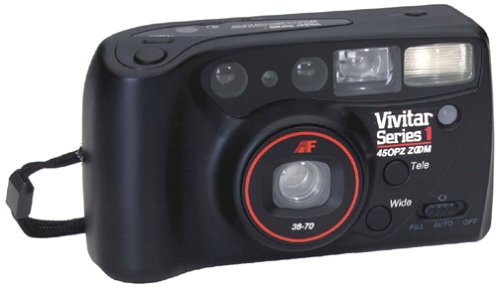
Kuva: Edessä view of the Vivitar 450PZ 35mm Camera, showcasinsen kompaktin rakenteen ja objektiivin ansiosta.
Asennus
1. Akun asennus
- Paikanna kameran rungossa oleva akkulokeron kansi.
- Open the cover by sliding or lifting it according to the indicator.
- Insert the required CR123A type batteries, ensuring correct polarity (+/-) as indicated inside the compartment.
- Sulje paristolokeron kansi kunnolla.
2. Filmin lataus
- Avaa kameran takaosa liu'uttamalla salpaa.
- Place a 35mm film cartridge into the film chamber.
- Pull the film leader across to the film take-up spool, aligning it with the start mark.
- Sulje kameran kansi. Kamera siirtää filmin automaattisesti ensimmäiseen ruutuun.
3. Wrist Strap Attachment
Attach the provided wrist strap to the designated loop on the camera body. This helps prevent accidental drops and provides a secure grip during use.
Kameran käyttö
1. Virta päälle/pois
Locate the power button or switch, typically near the shutter button. Press or slide it to turn the camera on or off.
2. Kuvien ottaminen
- Katso läpi viewFinder sommitellaksesi kuvasi.
- Press the shutter button halfway down to activate the autofocus and exposure systems. The camera will automatically set the focus and exposure.
- Press the shutter button fully down to take the picture. The film will automatically advance to the next frame.
3. Zoomaustoiminto
Use the zoom control (usually a lever or buttons near the shutter) to adjust the focal length between 38mm (wide-angle) and 70mm (telephoto). This allows you to bring subjects closer or capture a wider scene.
4. Salaman toiminta
- Automaattinen salama: The flash will automatically fire in dimly lit conditions to ensure proper exposure.
- Punasilmäisyyden vähennys: When activated, the camera emits a series of pre-flashes before the main flash to reduce the red-eye effect in portraits.
- Flash Off Mode: For situations where flash is not desired (e.g., museums, theater), locate the flash mode button and select the 'flash off' setting.
5. Itselaukaisin
To use the self-timer, press the self-timer button. A flashing LED indicator will typically signal the countdown. After a set delay (e.g., 10 seconds), the camera will automatically take the picture, allowing the photographer to be included in the shot.
6. Elokuvan kelaus taaksepäin
When the film roll is complete, the camera will automatically rewind the film back into the cartridge. A mid-roll rewind function may also be available, allowing you to rewind the film before the roll is finished by pressing a specific button (refer to camera markings if available).
Huolto
Kameran puhdistaminen
- Pyyhi kameran runko varovasti pehmeällä, nukkaamattomalla liinalla.
- For the lens, use a specialized lens cleaning cloth and lens cleaning solution. Avoid touching the lens surface with your fingers.
- Do not use abrasive cleaners or solvents, as these can damage the camera's finish and optical components.
Varastointi
- Kun kameraa ei käytetä, säilytä sitä viileässä, kuivassa paikassa, poissa suorasta auringonvalosta ja äärimmäisistä lämpötiloista.
- Poista paristot vuotojen estämiseksi, jos kameraa ei käytetä pitkään aikaan.
Vianetsintä
Kamera ei käynnisty
- Tarkista, että paristot on asetettu oikein päin ja oikea napaisuus on oikea.
- Vaihda vanhat tai tyhjentyneet paristot uusiin.
- Varmista, että virtakytkin on 'Päällä'-asennossa.
Film Not Advancing
- Verify that the film is correctly loaded and the leader is engaged with the take-up spool.
- Check if the film door is securely closed.
- Ensure there is enough power from the batteries for the motor to operate.
Salama ei välähdä
- Confirm that the flash is not set to 'Flash Off' mode.
- Allow sufficient time for the flash to charge (indicated by a flash ready lamp).
- Ensure ambient light conditions are dark enough for the automatic flash to activate.
Tekniset tiedot
| Ominaisuus | Yksityiskohta |
|---|---|
| Merkki | Vivitar |
| Mallin nimi | 450PZ |
| Filmimuodon tyyppi | 35 mm |
| Linssi | 38-70mm Zoom |
| Altistuksen hallinta | Automaattinen |
| Tarkennusjärjestelmä | 14-zone Autofocus |
| Salama | Automatic with Red-Eye Reduction |
| Film Handling | Motorized Loading, Advance, and Rewind |
| Erikoisominaisuudet | Built-In Flash, Compact Design, Electronic Self-Timer |
| Tuotteen paino | 15.2 unssia |
| Mukana olevat komponentit | Kameran runko ja linssi |
Takuu ja tuki
Takuutiedot
The Vivitar 450PZ camera comes with a warranty covering one year on parts and 90 days on labor from the date of purchase. Please retain your proof of purchase for warranty claims.
Asiakastuki
For technical assistance, service, or further inquiries regarding your Vivitar 450PZ camera, please refer to the contact information provided with your product packaging or visit the official Vivitar webtukiresurssien sivusto.